



Kip wrote:
Have you noticed that if you go to the import dialog box and go under media to photos to grab some pictures from iphoto those photos won’t show up in the link panel in CS3? But you can finally do this in CS4!
I am embarassed to admit I hadn’t even known about the Media option, which is new in Mac 10.5 (Leopard). It’s hiding down at the bottom of that drawer-kind-of-thing on the left side of the Place dialog box. There are three options: Movies, Music, and Photos.

If you have your photos stored in iPhoto, this can be a compelling way to import them into InDesign. Just select the ones you want and choose Open. Note that you can right-click (or Control-click with a one-button mouse) to view it by list instead of icon:
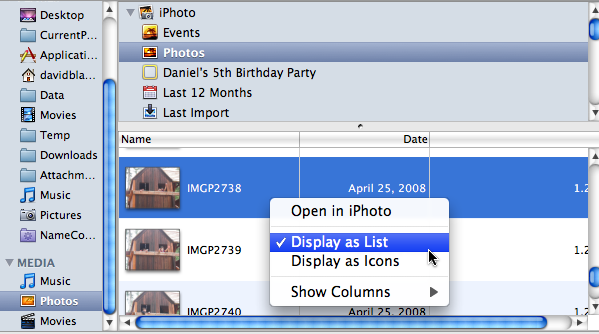
Even more cool: If you select an image and press the spacebar, it enlarges so you can see it better (just like it does in the Finder, but only inside this dialog box).
If you’re creating interactive PDF documents, the Music and Movies options may be of interest to you, as they let you actually preview movies and sounds before importing them. Of course, the files must be in the proper location (basically stored in iTunes) for this to work. Again, to preview a movie or sound, press the spacebar.
However, InDesign only lets you select or preview media that InDesign can actually import. For example, you can play an AIFF file, but not an MP3. A .mov works, but an .mp4 does not.
Thanks, Kip, for pointing out that feature!
This article was last modified on December 19, 2021
This article was first published on January 19, 2009
Commenting is easier and faster when you're logged in!

Recommended for you

Using Adobe Stock with InDesign
Back in June, Adobe launched a new service for Creative Cloud users, Adobe Stock...

Easter Egg Stroke Styles
Hey, it's Friday. Time for a little fun easter egg involving stroke styles (incl...
Split Text Color from Black to White in the Middle of a Frame
Need some text to suddenly change color when its over a dark background? This te...