



Nested styles are a fantastic tool for automating complex formatting inside a paragraph in InDesign. With them, you select character styles and tell InDesign which characters in the paragraph delimit the range of text where you want the character styles to be applied.
And the dialog box where you create nested styles even includes a handy menu where you can select certain special characters and markers as delimiters.

But what if you want to use a special character that’s not in the menu? For example, what if you wanted to use a Right Indent Tab as a delimiter in your nested style? In that case, take advantage of the more comprehensive menu of special characters in the Find/Change dialog box.
Take a look at the list of items in the @ > Other menu in Find/Change. If you choose a Right Indent Tab, the code ^y appears in the field.

You can now copy and paste this code into the nested style control field.
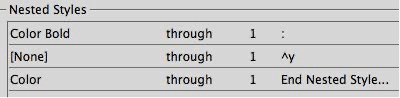
The Find/Change dialog box also displays codes for other objects not listed in the nested styles menu, including several kinds of symbols, markers, hyphens and dashes, spaces, and even text variables.
This article was last modified on October 21, 2024
This article was first published on October 21, 2024
Commenting is easier and faster when you're logged in!

Recommended for you

Making a Vertical Bar in a Table (without using tables)
Making a vertical line in a table without using tables requires some tricky text...

Holiday Text FX, part 3: Fun With Nested Styles
Learn how to use nested styles to make this cheery greeting in InDesign.
Get Your Footnote Number Back
Deleted one of your footnote numbers? Don't panic! Here's a (very obscure) way t...