




This is one of those really esoteric solutions that makes sense for the two or three people who need this specific feature, but I’m writing it out hoping that others will take the concept behind the feature and apply it elsewhere.
First, here’s the problem.
I generate a TOC from the Chapter Names and the A Heads in my book. The TOC dialog box contains the controls to add tabs and numbers after the chapter name, but there’s no control to add anything before the entry.
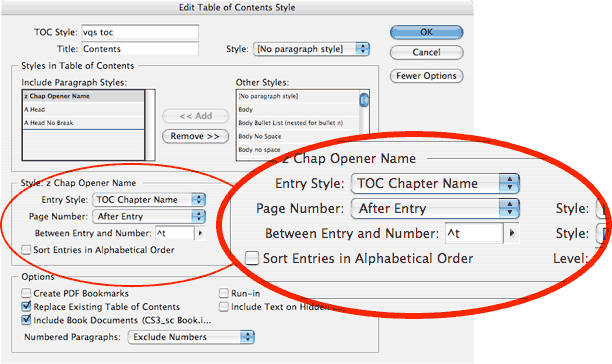
In the past I have had to manually type “Chapter #” in front of each chapter name entry in the table of contents. It hasn’t been too difficult for 21 chapters, but it meant having to retype those manual entries if the TOC changed. Not fun.

This time I had a brilliant thought. Why not make the TOC entry a numbered list. In front of the chapter name entry, I could add the word “Chapter” and then insert the number from the numbered list as well as the tab character separating the number from the Chapter name.
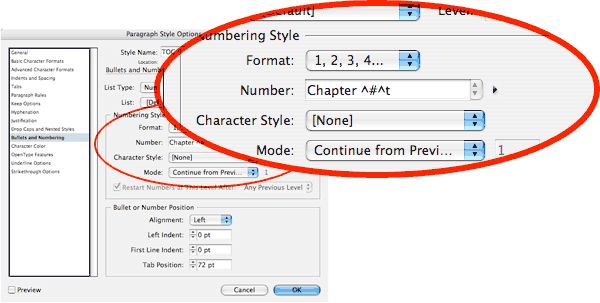
With the mode set to continue from the Previous number, each chapter entry automatically gets a number which just happens to be the same as its actual chapter number.
I’m psyched about this technique and hope someone else can use it. (Hmmm, David, how’s your book doing?)
This article was last modified on December 18, 2021
This article was first published on August 24, 2007
Commenting is easier and faster when you're logged in!

Recommended for you

Convert to Outlines in InDesign and Keep Your Editable Text
Khara Plicanic creates text outlines and keeps an editable copy with one click!

Inside the Adobe Admin Console
Knowing how your IT department controls Creative Cloud apps and services can hel...

Don’t Ask Your AI to Identify a Font
When it comes to identifying typefaces in images, artificial intelligence isn't...