


Forum Replies Created
-
AuthorPosts
-
 David BlatnerKeymaster
You’d probably want to make your document start on a left-hand page by starting the first page on page 2.
and then the page numbering you’d do the same way as a normal InDesign document: Just put automatic page numbers on a master page.
David BlatnerKeymasterI agree that this can be confusing at first. The little “reference point” boxes mean “the part of the object you’re controlling.” However, you can only base the page measurement on the upper-left corner of the page. So, for example, if you want to put the upper-right corner at 1/2 inch from the right side of an 8.5″ page, you’d set it to 8″.
As it turns out, there are much better controls when it comes to anchored objects. For example, here’s how you’d do it if you were anchoring the upper-right corner of a frame to the upper right corner of the page:
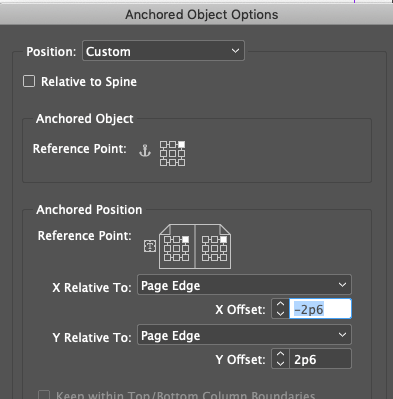
But of course, this requires you to anchor it in a text frame… not just loose on the page.
David BlatnerKeymasterWell, if you set up the document and data well enough then you may not need to make changes after use Data Merge… in that case, if you have new information or new horses you can just re-do the data merge. It’ll only take a minute, so no big deal.
Also, if you use data merge, then each horse would probably be on its own page (or own spread), right?
David BlatnerKeymasterI don’t understand why you need to do this as a book document… seems like using Data Merge to make a single InDesign document would be far easier.
David BlatnerKeymasterWell, automated solutions will only work if there is a very specific pattern. As soon as you have a need like “sometimes it’s like this, but other times it’s like that,” then it’s probably not automatable, and you’re likely going to need human involvement.
David BlatnerKeymasterCool idea! Hm. You could use a tool like IndexMatic (from indiscripts.com) to find what page they’re on, like an index. Or you could use FindChangeByList (which is a free script that comes with InDesign, but takes some work to set up). Or you could use Multi FindChange from automatication.com… not sure… just brainstorming…
David BlatnerKeymasterHm… maybe some preferences got turned on somehow? Like this:
David BlatnerKeymasterHm… Perhaps they were drawn using Word’s drawing tools? Maybe select them, copy and paste them into another Word document, and then save the document as a PDF?
-
AuthorPosts