


Forum Replies Created
-
AuthorPosts
-
 David BlatnerKeymaster
Ah HA! I see what you mean now. Thanks. We’ll ask our site designers to update that. But technically, we are asking you to subscribe… subscribe to the podcast! :)
August 20, 2014 at 6:43 am in reply to: indesign quit unexpectedly with this error " Transparency blend Space " #70170David BlatnerKeymasterIs this all documents, or just this one?
I wonder if the document is corrupt? Have you tried to export it as an IDML file, then open that IDML file and try again.David BlatnerKeymasterHi Eugene! Thanks for the heads-up, but I don’t see the link you’re talking about. Where on the forum is there a podcasts or subscribe link?
David BlatnerKeymasterNope.
Maybe put the objects on different layers, then lock the layers when doing find/change?David BlatnerKeymasterHm. Can’t think of anything off the top of my head, sorry.
David BlatnerKeymasterI think we may have fixed your account, so please try again.
But if that doesn’t work, or if you have any other troubles, please contact us via email at support [at] indesignsecrets.com
David BlatnerKeymasterI would check to ensure that the style name is EXACTLY the same; no extra spaces, etc. — I prefer using the Synchronize Book feature to ensure that all the style names are exactly the same, though you need to be careful that this doesn’t override stuff you don’t want it to (check the Synchronize Options dialog box before proceeding).
August 13, 2014 at 7:02 am in reply to: Move every object on every page toward or away from spine #70097David BlatnerKeymasterAre you saying that it works on the first document, but not on the second document of a book? I don’t think the script knows whether the document is part of a book — it just works on whatever document is open at the time — so this seems odd.
David BlatnerKeymasterUnfortunately, the only way to put an image here is to post it on some other site (there are a ton of “post your image here” sites) and then reference it with an IMG html link.
I think the answer to this, however, is: InDesign does not offer distortion tools. You can shear, scale, and rotate, which is enough to fake a little simple perspective, but probably not enough to do what you want. Illustrator has far more ability to distort shapes.
David BlatnerKeymasterA couple of quick notes:
For handling vertical justification better, check out the Proper VJ plug-in:
https://in-tools.com/products/plugins/proper-vj/
(I believe Harbs wrote this based on ideas from Brad Walrod.)As for Kytek… I remember Keith Erf well, and I remember asking him 10+ years ago if he was going to do something for InDesign. Oh well. In the meantime, I think a lot of that composition market has gone to products from Typefi.com
David BlatnerKeymasterWell, that’s curious. “Embed Link” is what shows up when you have a graphic/picture selected, not an excel document. Hm. Are you sure these are spreadsheet files and not graphics?
If so, I would try exporting as IDML (from the Save As or the Export menu) and then opening that IDML. That clears out corruption and weirdness.
David BlatnerKeymasterWow, that’s weird. Here’s how it looks for me.
If you don’t see this, then I would suggest rebuilding your InDesign preferences or possibly exporting the file as IDML and then opening the IDML file to rebuild the doc.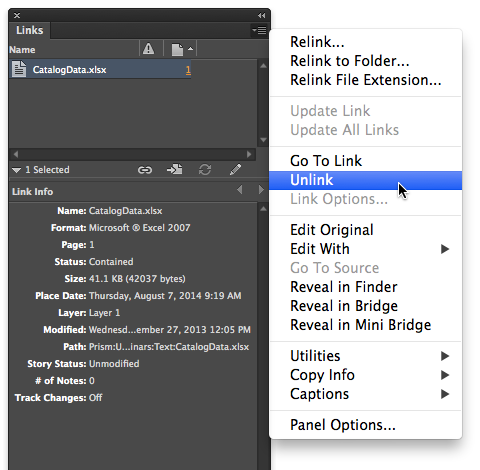
-
AuthorPosts