


Forum Replies Created
-
AuthorPosts
-
 David BlatnerKeymaster
That is really weird. I would also suggest rebuilding your preferences: https://creativepro.com/resources/faq
David BlatnerKeymasterWhy you should use File > Export instead of distiller: https://creativepro.com/creating-pdf-export-or-use-distiller.php
But if you need to use Distiller: https://creativepro.com/creating-postscript-files-in-snow-leopard-for-older-print-workflows.php
David BlatnerKeymasterThere is no automatic way to make text automatically shrink to fit a frame. Colin Flashman (who will be presenting at this year’s PePcon in San Diego) wrote up an interesting workaround here: https://colecandoo.com/2012/02/18/square-pegs-now-fit-into-round-holes/
David BlatnerKeymasterDoes it work if you copy out of InDesign and paste into any other program, such as Word? If it does work there, then consider trying a different web browser to paste into?
David BlatnerKeymasterI love your idea, Ari. And I totally agree that you and many other “readers” out there have amazing things to share. We welcome that. In fact, there’s a “Write for Us” link at the bottom of the page ( https://creativepro.com/write-for-us ). Tell us what you’d like to write about, and Mike will get back to you ASAP with instructions on how to proceed.
Many of our authors today started just like this!
Here in the 21st century, the only thing we know is that no one one can know it all! That’s why it’s so important for us all to work together and share our knowledge. “Together we thrive!”
Thanks for reaching out on this.
David BlatnerKeymasterIf this is one document, then my guess is that the text anchors are pointing to an earlier version of the document. Perhaps you renamed it? I remember seeing something like this, but it’s been a while since I ran into that problem.
David BlatnerKeymasterIs it happening with any particular kinds of links? Or truly all the links?
A red circle means that InDesign can’t find a URL. A red flag usually means it’s looking for a “text anchor.” If the anchor is in a different InDesign document which isn’t where it is expected, that could certainly happen. I hate using text anchors from one document to another; it can cause too many problems. Much better to have all the documents together in one huge document if you need that kind of thing.
March 11, 2016 at 10:59 am in reply to: Front page poll – missing options (What version of InDesign are you using?) #82869David BlatnerKeymasterGreat point, Chris! We’re changing that poll very soon anyway, but in the future we’ll keep that in mind.
David BlatnerKeymasterDavid BlatnerKeymasterDavid BlatnerKeymasterI think we’re going to run this in tomorrow’s “tip of the week” email, so look for solutions there. (Spoiler: There’s no good way to deal with tables of unequal width.)
As for uploading images to the forum: you’d need to upload it somewhere like imgur and then post a link here.
David BlatnerKeymasterDo you mean for color blindness? Unfortunately, InDesign doesn’t have that feature. Only Illustrator.
I wonder if you could export as a PDF, place or open that PDF in Illustrator and use the features there?
David BlatnerKeymasterYou can learn more about grep styles here: https://creativepro.com/5-cool-things-you-can-do-with-grep-styles.php
David BlatnerKeymasterYup! You can make two tables, then select both paragraphs and set them to Split 2. That will split the column into 2, with one table on the left and one on the right.
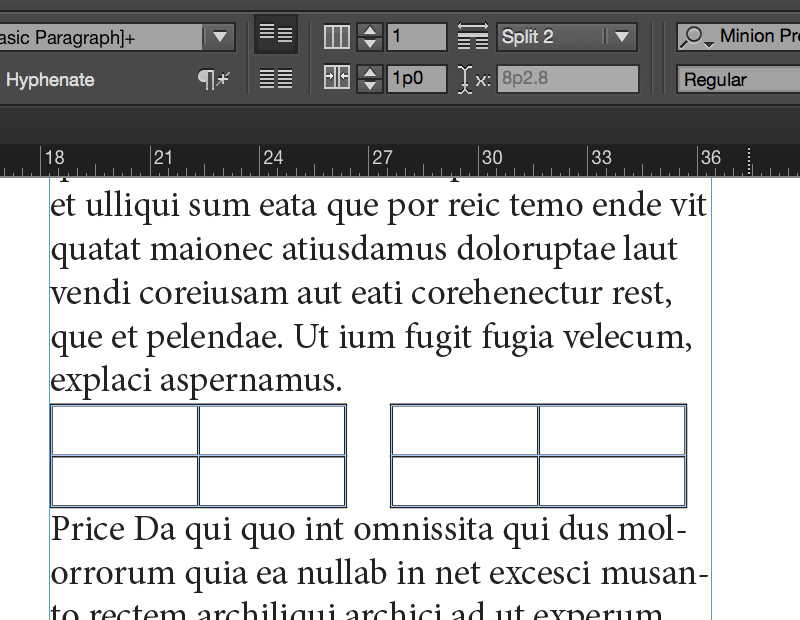
Neat huh? I should write that up as a blog post… :-)
-
AuthorPosts