


Forum Replies Created
-
AuthorPosts
-
 David BlatnerKeymaster
Here is an example of what Kai may be talking about (as a flow):
https://www.lynda.com/InDesign-tutorials/Auto-reflow-images-grid/85324/493068-4.html#tab
or
https://creativepro.com/auto-reflowing-images-in-a-grid.phpOften this kind of thing is done with data publishing though… probably depends on how many pages you need to do.
David BlatnerKeymasterThere are some suggestions about why scripts sometimes do or don’t run here: https://creativepro.com/how-to-install-a-script-in-indesign-that-you-found-in-a-forum-or-blog-post.php
David BlatnerKeymasterIt’s probably worth trying ID2Office to see how they do it (recosoft.com)
March 20, 2017 at 8:56 am in reply to: How to export (PDF) a document with only part of the content #93005David BlatnerKeymasterSounds like InDesign’s Conditional Text feature is what you might need:
https://creativepro.com/tag/conditional-textMarch 19, 2017 at 5:17 pm in reply to: Fit content to frame, while maintaining one original frame edge location #92982David BlatnerKeymasterIt’s not hard to do with 2 quick steps:
Select all the frames on your page, then apply an object style with Frame Fitting options like this:
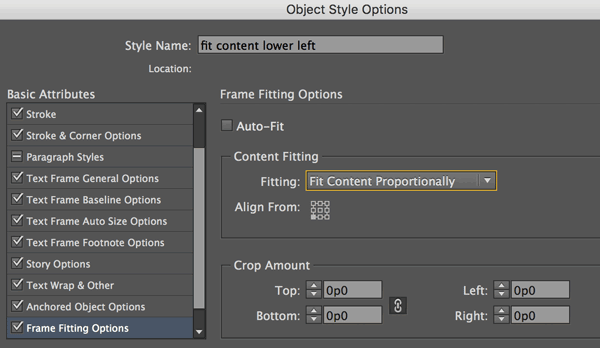
That will fit the images to the frame, anchoring them in the lower left corner.
Then while everything is still selected, use the keyboard shortcut for Object > Fitting > Fit Frame to Content.
David BlatnerKeymasterAtit: Can you tell us what page is logging you out? I have an idea that might be the problem… sometimes it is a problem with the URL being “http” instead of “https”
Maybe we can fix it.David BlatnerKeymasterWhat does the google material design” look like? Samples?
March 6, 2017 at 8:42 pm in reply to: Creating Index Page Numbers by Image Link Name Question! #92704David BlatnerKeymasterYou could use a caption (live or static) to grab the file name of the image and put it in a frame and then index that.
Or you could get a list of images in the document and what page their on and cobble it together that way?
https://creativepro.com/get-a-list-of-images-in-your-document.php
https://creativepro.com/create-a-list-of-linked-files.phpDavid BlatnerKeymasterNo that feature has not changed. Have you tried the script that Dave Saunders wrote (listed in the comments there)? Does it need to be updated?
David BlatnerKeymasterIt is strange that it would ask for an ASCII character… can you type a Unicode number instead?
David BlatnerKeymasterSorry, sewing your own signatures is outside my knowledge! I pretty much focus on what can be done inside InDesign here. :-)
You may know that InDesign does have a File > Print Booklet feature. -
AuthorPosts