


Forum Replies Created
-
AuthorPosts
-
 David BlatnerKeymaster
There are plug-ins such as movemen’s MathTools: https://movemen.com
They showed their tool at The InDesign Conference last month and it was awesome!David BlatnerKeymasterNo, you should definitely not be copying and pasting large chunks of text from Word to InDesign. That’s what the File > Place feature is for! :-)
We have a number of tutorials on this site, and there are also movies on Lynda.com/LinkedIn Learning. For example:
https://creativepro.com/mapping-word-styles-indesign-styles-free-video.php
https://creativepro.com/import-word-files-into-indesign-remove-local-formatting-but-keep-italics-and-bold.phpDavid BlatnerKeymasterKai, I do not understand how this can work in a 2-column text frame with a single paragraph style. You cannot use Span Columns or Split Columns, I think. So the only solution is to change the Space Above for the first paragraph and the Space Below for the last paragraph (so you need 3 paragraph styles). No? Or… am I missing a trick?
David BlatnerKeymasterInteresting… it sounds like what you’re trying to do is adjust the way InDesign handles short words in is paragraph composer. That’s a cool idea, and I can see the value. But I don’t think InDesign has any way to do what you’re looking for.
Actually, here’s an idea… you could use the “No Break” feature to keep the short words with the words that follow them. For example, you could set up a grep style inside the paragraph style that looks for 1 or 2 letter words followed by another letter. Like this:
 David BlatnerKeymaster
Yes, you are correct: This particular trick only works with a single column text frame.
The reason it works, by the way, is that when you use split/span columns, you’re actually creating a new “zone” on the page. Think of a text frame as a zone. And now the split/span column feature adds another “zone” inside the text frame — almost like having an anchored frame or a table in there. The space above/below is applied to the whole zone.
David BlatnerKeymasterSacha, I’m not sure your request makes logical sense. You want a DLB to break where to you want it to, but later, if you change the text frame width, then you don’t want it to break anymore? I think you probably just need to use a Shift-Return (forced line break) and later, if the frame changes size, you can use Find/Change to remove all the forced line breaks.
Alternatively, you could change the right indent to force it to break differently. Or you could select the paragraph and turn on Balance Ragged Lines — that might give you the effect you want, even without adding a discretionary line break.
David BlatnerKeymasterAh ha! You were typing at the same time as I was uploading my image… thanks for the explanation.
David BlatnerKeymasterWhat I like about Michel (Obi-wan) is that he thinks “outside the box” and comes up with very creative solutions to problems. But unfortunately, sometimes his replies are somewhat mysterious and confusing.
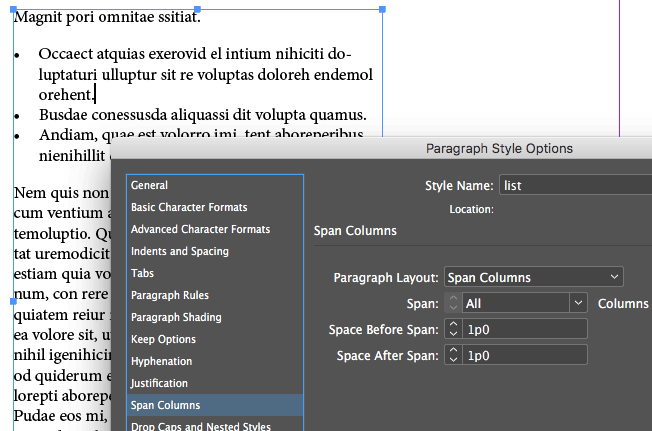
Dwayne, you are correct that the Span/Split columns feature is usually used for splitting or spanning multiple columns. But you can actually use it for a single-column text frame, too!
And the interesting thing about Span Columns is that it has a Space Before Span and and Space After Span feature. That means the feature lets you “group” paragraphs together, like this:
 David BlatnerKeymaster
Fun puzzle! You could use first paragraph style and last paragraph style variables to place the text. You could use a “column-wide” rule below and a “text-wide” rule above to create the lines. Yes?
David BlatnerKeymasterOh my gosh, you are right. Drat!
OK, so the answer is: Balance Columns disables Keep Options. (That’s sad, though it is a little bit understandable. There would be no way to truly balance the columns and maintain the keep options.)David BlatnerKeymasterThe problem, I believe, is that everything is set to “keep with previous.” After all, if everything had to keep with previous, then it would all have to stay in a single column… so InDesign gives up and says, “well, I have to break it somewhere!”
If you open Preferences, click the Composition pane, and turn on Keep Violations (then click OK), you’ll see that InDesign is telling you that it had to break the line.
The solution is to let InDesign break the column somewhere. In this case, you probably want to edit the “Question Stem” paragraph style to not keep with previous.
David BlatnerKeymasterInteresting idea! I know they have done a lot of work for Windows Tablets (Surface). And of course there is already Photoshop and Illustrator on iOS (not the full versions, but some of the functions). However, I think it would be extremely difficult for them to put InDesign on iOS. (Other than the cool Adobe Comp app.)
David BlatnerKeymasterAre you using split columns? (In the Span Columns dialog box.) Or are you using a multi-column text frame?
-
AuthorPosts