


Forum Replies Created
-
AuthorPosts
-
 David BlatnerKeymaster
Here are some options:
https://creativepro.com/when-indesign-ignores-your-leading-values.phpDavid BlatnerKeymasterIf you scale an image, it changes the resolution. If an image is scaled disproportionally (such as 98% horizontal and 101% vertical) then you’ll get different effective PPI resolutions.
December 6, 2017 at 8:37 am in reply to: Linking to destination within a Publish Online document #100097David BlatnerKeymasterIt’s a great question, but I don’t think there is currently any way to do that. Are you getting a TOC in your document to work? That was broken before. Might be fixed now:
https://indesign.uservoice.com/forums/601180-adobe-indesign-bugs/suggestions/32396368-links-on-toc-doesn-t-workI encourage you to use the indesign.uservoice.com site to make requests like this.
David BlatnerKeymasterThere is also the ID2Office plug-in from Rorohiko.com — it has a great way to export directly from InDesign to Powerpoint (or Keynote).
Otherwise, sometimes people just export all the InDesign pages as PNG or JPEG and place those as static images in PPT.
David BlatnerKeymasterThe new zoom behavior is actually quite nice once you get used to it. But you can turn it off:
https://creativepro.com/gpu-support-and-animated-zoom-arrives-for-mac.phpDavid BlatnerKeymasterErik, I noticed this, too, but I did not know it was all scripts… I thought it was just a couple that I had tried.
Perhaps it is a bug in the newer versions of Mac InDesign?
November 28, 2017 at 5:50 pm in reply to: Indesign with text box importing text from web page #99935David BlatnerKeymasterIt hasn’t been updated in a bit, but it’s pretty cool: https://www.id-extras.com/html-import-script
Can you describe why you want to import HTML into InDesign? What is your workflow?
November 26, 2017 at 8:47 am in reply to: how to align 9 separate text frames around a circle #99883David BlatnerKeymasterA few hundred diagrams?! Wow, yes, you made the right choice by getting Obi-wan’s script!
November 25, 2017 at 8:27 am in reply to: how to align 9 separate text frames around a circle #99880David BlatnerKeymasterRobert, how many of these illustrations are you going to make? If it’s just one or two, why don’t you just place each text frame manually? It shouldn’t take long to place the text.
It seems like you could also do this by just putting the text in a 2-column frame and then using text wrap:

You can load an image here by uploading it to an image sharing service, such as imgur.com or imgbb.com and then copy and paste the URL here.
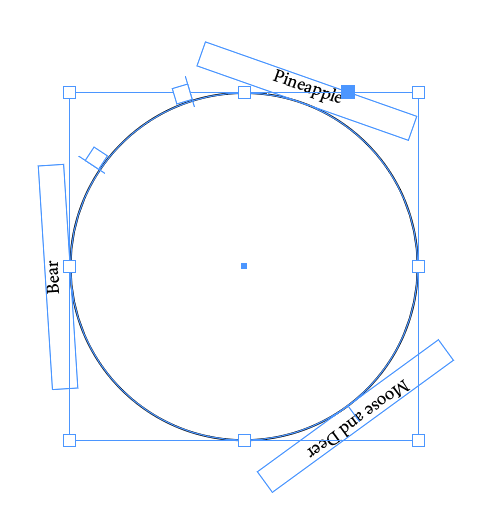
November 24, 2017 at 11:07 am in reply to: how to align 9 separate text frames around a circle #99858David BlatnerKeymasterI don’t think you need a script to do this. You can easily put text (or groups of text) around a circle with the text-on-a-path tool and anchored objects:
 David BlatnerKeymaster
I was confused because you said it was an EPUB file… but you cannot embed an EPUB in HTML (that I know of). What you have in your example is a “Publish Online” document. I don’t think there is any way to remove that gray area. You might be able to adjust the position of their html inside the iframe, though. You would use CSS to set the position of the content inside the iframe and the size of the iframe.
-
AuthorPosts