


Forum Replies Created
-
AuthorPosts
-
 David BlatnerKeymaster
Are you printing directly to a printer that is a “PostScript printer”? If it doesn’t have PostScript, then it might be some kind of weird problem with the printer driver. Check the various settings in the driver, or in the Print dialog box.
And, of course see if it works in a PDF.
David BlatnerKeymasterWell, you can design the layout any way you want if you’re doing a single-record-per-page layout. If you are doing a multiple record merge, then it will take all the objects and put them in a grid.
I’m not sure why your Update is not working correctly. Perhaps it cannot find the links to the images? Or perhaps something “broke” the tags, so they’re not tagged to the data anymore. This should work okay normally, as I show in my Lynda.com/LinkedIn Learning course.
David BlatnerKeymasterI don’t usually update the data… instead, if something changes, I just re-merge the whole thing. But if you want to update the merged version, you can… but I believe you need to have your data “tags” on the master page first (before the merge). Did you do that?
I recorded a movie on this here: https://www.lynda.com/InDesign-tutorials/Using-master-pages-Data-Merge/143323/163267-4.htmlDavid BlatnerKeymasterHi Patti… this is controlled in the Strokes panel. While no objects are selected on the page you can set the stroke to Inside. That will set it as the default for new objects you create. Here’s more on that:
https://creativepro.com/changing-the-default-stroke-to-inside-or-outside-instead-of-centered.phpDavid BlatnerKeymasterThat’s basically the default for that kind of tool. You can change the defaults by setting them when no objects are selected on the page:
David BlatnerKeymasterI wrote an article with Conrad Chavez in a recent InDesign Magazine about how to move layered InDesign files to Photoshop:
https://creativepro.com/issues/issue-107-photoshop-indesign
That (mac-only) script is one good way, but you can fake it manually by exporting each of the layers and combining them (hassle, but it works). Layered PDF won’t work because PS doesn’t read layered PDFs… just PSD files.David BlatnerKeymasterRafael, I understand you are still having problems with this. If you need to use Find/Change, you can do it like this:
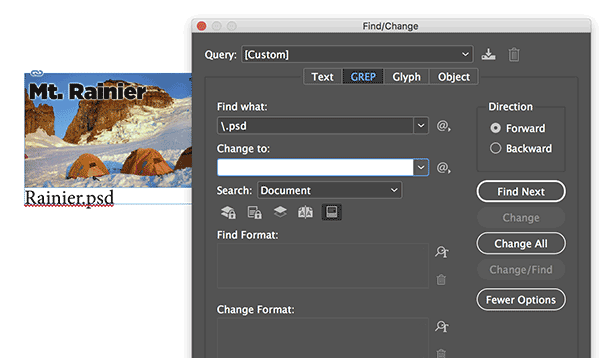
Or, if you want to use a grep style inside a paragraph style, you must first create a character style (in the Character Styles panel) that will make the text “disappear” (I suggest 0.1 pt text and set the color to None). Then you have to make a paragraph style and apply it to the caption text. Inside the paragraph style, you make a grep style like this:
 David BlatnerKeymaster
Yes, that is the expected result (for all versions of InDesign). Placing an INDD into an InDesign doc acts like a graphic.
But I’m reading the original post and I’m confused:
- First of all, Lulu does not require Single-sided pages, and if they do say that they are wrong. You should have created this with facing pages. My guess is that they don’t want the PDF to be created as spreads (meaning use Pages rather than Spreads when exporting to PDF).
- If the document is already in non-facing pages, then do you have a single master page with Left and Right pages, or do you have 2 master pages that are both single sided?
- The best way to handle this is probably just to apply a different master page to all your odd pages (or even pages). It will take about 5 or 10 minutes to go through 150 pages, but that’s faster than messing around with these other options
David BlatnerKeymasterI can’t remember if CS3 let you place INDD files into other INDD files… does it?
There is a CS3 version of the script… see the link in the article.David BlatnerKeymasterPerhaps they are set up with Creative Cloud for Teams? Does this help? https://forums.adobe.com/thread/2107090
David BlatnerKeymasterHI Sayed, here is an article about how to run scripts:
https://creativepro.com/how-to-install-a-script-in-indesign-that-you-found-in-a-forum-or-blog-post.phpDavid BlatnerKeymasterThank you, Michel! OK, I see my mistake. This script works if the layer is called “images” — of course, you can change that to any other layer name, but it must be changed in 2 places in the script.
var myLinks = app.activeDocument.links, L = myLinks.length;

while (L--) if (myLinks[L].parent.parent.parent.constructor.name != "Character" && myLinks[L].parent.parent.itemLayer.name != "images") myLinks[L].parent.parent.itemLayer = "images";
I understand that you have written a more robust script that can do much more, and does error checking (and that people can pay you for that version). But thank you for sharing this simple free version.
David BlatnerKeymasterif the file is called foo.psd then you can just search (in the Find/Change dialog box, GREP tab) for
\.psdand then leave the Change To field blank. That should delete it.(If you add the \w, then you are saying there must be another letter after the .psd )
-
AuthorPosts