


Forum Replies Created
-
AuthorPosts
-
 David BlatnerKeymaster
Sometimes it’s the image… consider opening it in Photoshop (if it’s a bitmapped image) or Illustrator (if it’s vector) and doing a Save As.
David BlatnerKeymasterI’m not sure if this is what you need, but does this help?
https://creativepro.com/tab-stops-in-indesign-tables.phpDavid BlatnerKeymasterHi Donna, sorry your earlier post disappeared. I believe I answered that one in the General Forum and then noticed that it was a duplicate of one here, so I removed it.
There are many reasons why text could come in like that. Might have a character style applied to it, for example. More likely, though, the text had local formatting applied in Word. Here are a couple of articles you can read:
https://creativepro.com/import-word-files-into-indesign-remove-local-formatting-but-keep-italics-and-bold.php
and
https://creativepro.com/retaining-important-formatting-when-importing-word-documents.phpDavid BlatnerKeymasterI would encourage you to take a look at some of the training on Lynda.com or LinkedIn Learning, such as Anne-Marie’s excellent course on Word/InDesign integration:
https://www.linkedin.com/learning/word-and-indesign-integration
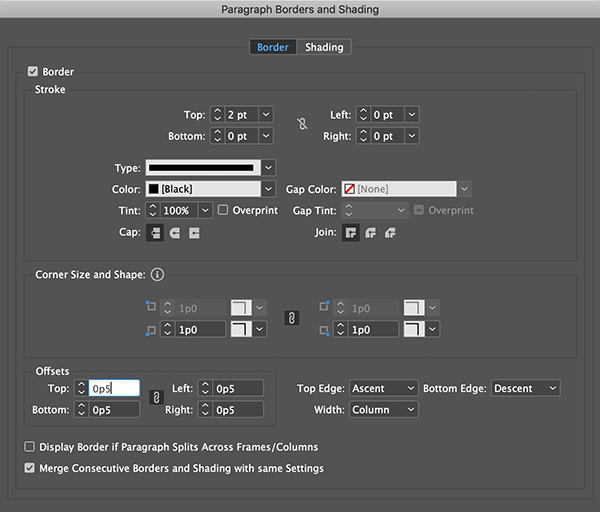
or my courses on essential indesign.David BlatnerKeymasterInstead of a Paragraph Rule, you could use Paragraph Border and set it to a border just on the top side. Then set the offset to Ascent:
 David BlatnerKeymaster
@Kampy: I love it when printers say “no problem” to PDF/X-4! That’s the best.
@Colleen: You are totally right that designers and clients need to know how colors will look after conversion to CMYK. That’s why soft-proofing (on screen) and hard-proofs like your prints are so important! You can even keep your images as RGB and turn on Proof Colors and keep working, so you can edit while viewing CMYK… but the underlying image is still RGB. :-)
David BlatnerKeymaster@Kampy: I love it when printers say “no problem” to PDF/X-4! That’s the best.
@Colleen: You are totally right that designers and clients need to know how colors will look after conversion to CMYK. That’s why soft-proofing (on screen) and hard-proofs like your prints are so important! You can even keep your images as RGB and turn on Proof Colors and keep working, so you can edit while viewing CMYK… but the underlying image is still RGB. :-)
David BlatnerKeymasterThe best option is probably fixed layout EPUB (FXL). Search this site for details. All Mac and iOS people have iBooks installed, which is great with FXL. But Windows and Android users will need to find an appropriate reader.
David BlatnerKeymasterIt’s possible the Basic Style is defined differently in the two files. Reflow is also possible when copying from a very old InDesign doc to a new one. Or perhaps there is local formatting on the text (look for a + symbol next to the paragraph style in the para styles panel).
In general you do not want to copy and paste from Word to InDesign, except for very small amounts of text. You should use File > Place.
David BlatnerKeymasterColleen, if you know that your document will always be printed, and it will always be on the same printing press, you could probably stick with a CMYK workflow, where everything is converted to CMYK. That’s what we call the 20th century workflow.
Today, most people don’t know where their documents are going to be printed tomorrow, and just as often the images and documents need to be repurposed for interactive/on-screen viewing.
In a 21st century color-managed RGB workflow, you can preview the same document in a variety of different output situations, but keep the flexibility to take it where you need it, at a moments notice. :-)
Hey, it would be awesome if you could swing down the coast and come to CreativePro Week in Seattle this June!
David BlatnerKeymasterIt’s so hard to know what the problem could be, because for 99% of InDesign users, we never have this kind of problem. The fact that roundtripping to IDML often helps is a clue that there is perhaps something corrupted in the document or your preferences.
David BlatnerKeymasterWhen you export to PDF, InDesign downsamples from the current image resolution (“effective ppi”) to the resolution you specify in the “Compression” pane of the Export PDF dialog box. For example, if the Effective PPI is 3500 ppi, then it will be downsampled to 300 ppi when you export the PDF (or whatever you have the compression set to).
The problem is that the Export PDF process does not downsample as well as Photoshop. So a 10 or 20% downsample is probably not a big problem. But if you downsample from 3500 ppi to 300 ppi, the image may get much softer in InDesign; Photoshop has better-quality downsampling algorithms.
April 4, 2019 at 7:04 am in reply to: Text size and line width acting weird after changing layout size #115820David BlatnerKeymasterTry selecting the frame with the Selection tool and choosing “Redefine Scaling to 100%” in the menu inside the Control panel or the Transform panel:
https://creativepro.com/getting-rid-of-text-size-parentheses.php#comment-476142David BlatnerKeymasterInteractive PDF plays VERY differently on different devices and different PDF readers. And yes, other readers are sometimes better than Adobe’s. Yes, it is frustrating. PDF is not currently a good format for video, buttons, or most other interactivity.
April 4, 2019 at 6:54 am in reply to: Text size and line width acting weird after changing layout size #115817David BlatnerKeymasterThat’s what happens when you use the Adjust Scaling Percentage scale. Try it!
-
AuthorPosts