


Forum Replies Created
-
AuthorPosts
-
 David BlatnerKeymaster
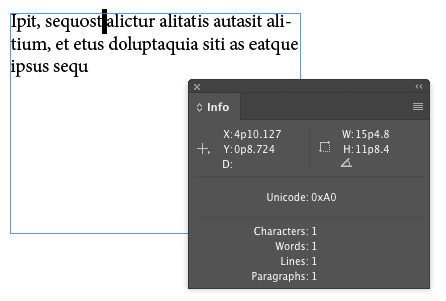
Hi Linda. I don’t think there is an ASCII code for this, but you may be able to use a Unicode value. If you insert one in some text and then select it, you can see in the Info panel that it is Unicode 0xA0
 David BlatnerKeymaster
Hm… no, not really. InDesign doesn’t work like Powerpoint or some other design tools.
However, if a document is set up correctly, you may be able to add a new master page and then apply the new master page to the pages.
David BlatnerKeymasterIt’s harder than it should be. You can fake it with various styling, but if you had to do a lot of them, you should probably invest in either a font that contains those characters already, or a math typesetting tool such as MathTools from movemen.com
David BlatnerKeymasterI think it’s in the same place as these other preference:
https://creativepro.com/rebuilding-indesign-preferences.phpDavid BlatnerKeymasterYou can probably turn this into a script using the FindChangeByList script. See:
https://creativepro.com/tag/findchangebylistDavid BlatnerKeymasterHi Jeffrey, yes, InDesign can do the conversion of RGB to CMYK. By default, CMYK images will be passed through unaffected. Grayscale images that are RGB will be treated as though they were color, so they will convert to a four-color CMYK. Grayscale is trickier… InDesign will normally just pass them through unaffected, which may be what you want.
If you have access to Lynda.com/LinkedIn Learning, I encourage you to take a look at my course “InDesign Color Management” which should give a pretty fast overview of the various factors.
David BlatnerKeymaster@Ken: No, I’m not a GoVersion user. I don’t think I would have the patience or the discipline! :-)
I think Anne-Marie had used it.
David BlatnerKeymaster@Barry: Be really careful with “smallest file size” PDFs! If the image is already in CMYK, it will be converted to RGB, and the resolution is dropped to a VERY low ppi! I would not use that pdf preset for anything.
@Chris: InDesign has the ability to check ink density using the Separations Preview panel. There’s even an Ink Limit setting in there. Check out the links below.If you’re placing RGB images into InDesign, then exporting the PDF to the desired CMKY (e.g. ISO Newsprint) will convert them properly, and within the ink limits. That is the best practice these days: leave all images as RGB and then let InDesign do the conversion when you make the PDF if you need CMYK.
But if you’ve already converted images to CMYK, then you’re stuck with them. SWOP is higher ink density than Newsprint, so that could be a problem.
Yes, if you leave “preserve numbers” off, then all CMYK gets “cross-rendered” from one CMYK to another, and 100% K will almost certainly change to 4-color black. Rarely a good idea.
If you have access to Lynda.com/LinkedIn Learning, check out my titles on “InDesign Color Management” and “InDesign: Print PDFs”
https://creativepro.com/force-color-images-cmyk-240-ink-limit.php
David BlatnerKeymasterI don’t think you can apply a grep style that acts across multiple paragraphs. The GREP style is really focused on patterns within a single paragraph.
However, you could use the GREP tab in the Find/Change dialog box to apply it. For example, you could search for
GIRL\r.+\r\K.and apply a paragraph style to it, like this:
This searches for the first character of a paragraph that is 2 paragraphs down from the word “girl” and applies the paragraph style to the whole paragraph.
David BlatnerKeymasterOh, right! Thank you, Colleen. (It would probably help if I slowed down and read it carefully.) :-)
So here’s my suggestion, George: Don’t use Illustrator for that task. Use InDesign! I know that seems crazy, but you can place the PSD on an InDesign page, then add the overlay circles and so on. Then you can save the InDesign document and place it into the master InDesign document!
Yes, you can place INDD files into InDesign, and they act just like PDF or AI files. However, when you package, InDesign is smart enough to package all the linked INDD files and the images that those documents link to!
David BlatnerKeymasterI don’t understand… are you saying that when you package the book (choose “Package Book for Print” from the book panel menu), it is not including the linked graphics from each document in the book? It should! You should not need to embed the images.
April 20, 2019 at 10:51 am in reply to: Outputting properties in console similar to Script Debugger #116205David BlatnerKeymasterWell you’re in luck… I think Peter Kahrel will be at the conference, too! :-)
April 18, 2019 at 9:20 am in reply to: Outputting properties in console similar to Script Debugger #116177David BlatnerKeymasterHi Ward, a couple of things to consider:
First, if you can, I’d like to suggest you come to the Creative Developers Summit during CreativePro Week:
There are lots of great resources (in the form of people, mostly!) to draw on. We’re going to be running a one-day session on Thursday which isn’t listed on that page yet, but which would really help you a lot.Second, in a couple of weeks we’ll be publishing Peter Kahrel’s new edition of his book “Javascript for InDesign.” That could help quite a bit, too. Look for it on the Shop page here on InDesignSecrets.
Third, Keith Gilbert has a course on scripting InDesign at Lynda.com or LinkedIn Learning, and he also wrote a little article about it in this issue of InDesign Mag:
https://creativepro.com/issues/issue-82-new-rules-for-printingFinally, here are some articles on our site that might help:
https://creativepro.com/javascript-for-the-absolute-beginner.php
and -
AuthorPosts