




A working group of people deeply invested in accessible EPUB has been collaborating with the InDesign team at Adobe for two years or so to upgrade how that software exports EPUB. That work is finally bearing fruit.
Two members of the board of the Accessible Books Consortium, Richard Orme from the DAISY Consortium and Laura Brady (your author!), along with Gregoria Pellegrino, the Chief Accessibility Officer from powerhouse Italian accessibility organization, Fondazione LIA, have engaged with the Director of Accessibility at Adobe and the engineering team to document places where InDesign’s EPUB export gets in the way of accessibility. There is some urgency to this work as the European Accessibility Act is due to go into effect in June 2025. Let’s take a look at the technical details.
Language
In Fall 2022, there was an update to how language declarations are exported from InDesign. Instead of putting the declaration on the <body> element, it now exports on the root HTML element. This implementation was a bit bumpy, but the bugs have been fixed in version 19.2 (February 2024). Now, the language declaration is in the correct place, in addition to being added to the HTML element in both the cover and navigation documents.
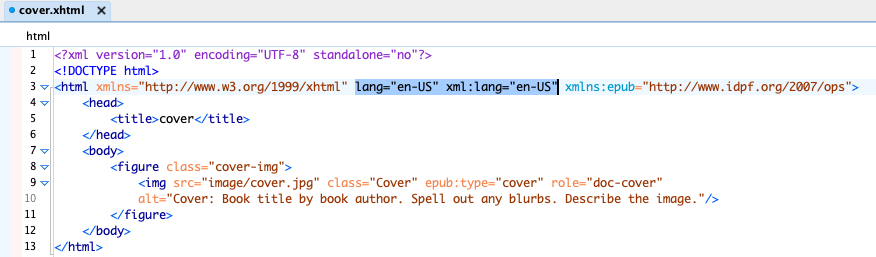
Prior to this, many ebook developers had to invest in manual or scripted fixes to the language issues. So while small, this is a welcome, time-saving update.
Decorative Images
In Fall 2023, there was another update to how elements are exported from InDesign. Any images that had no alt text applied via Object > Object Export Options > Alt Text, would be assumed to be decorative and would be exported as such.
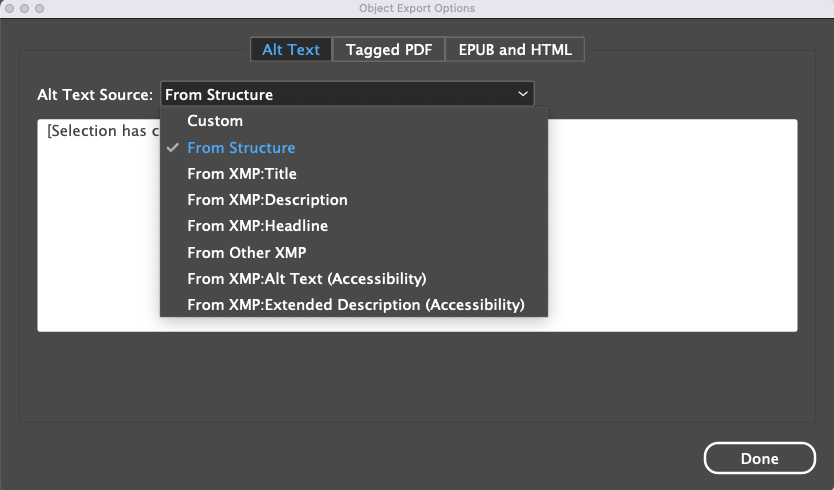
An image with no alt text would turn into the following HTML:
<img class="_idGenObjectAttribute-2" src="image/2.jpg" alt="" role="presentation" />
This is not a perfect implementation, so watch for an update in InDesign version 19.4 that will include an option to designate images as decorative rather than assuming that the lack of an image description means the image is presentational only.
Accessibility Metadata
The biggest new feature, and a real victory for accessibility and discoverability, is the addition of an Accessibility tab in the Metadata area of the Reflowable EPUB Export Options.
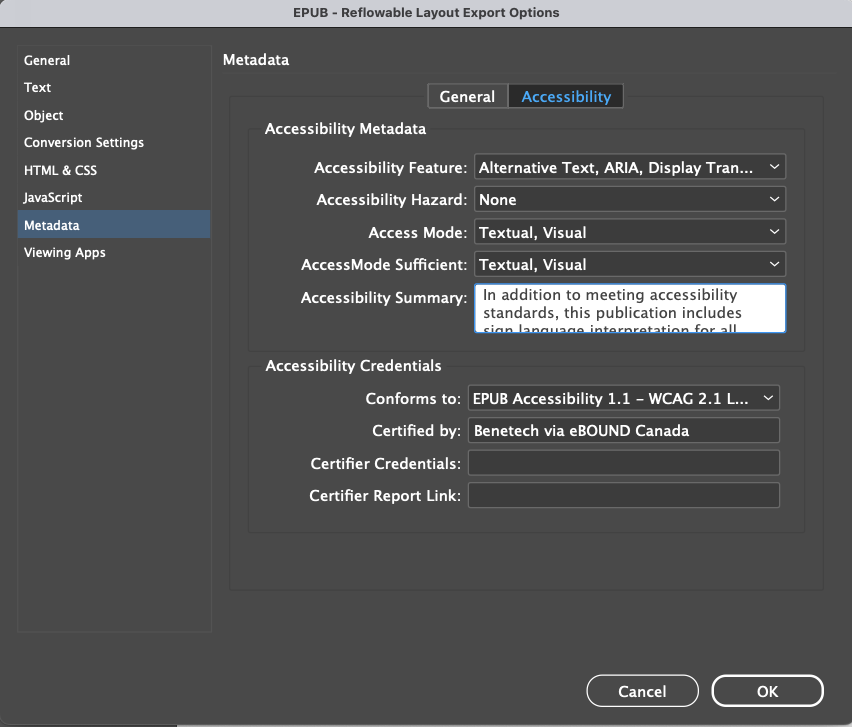
Most of the fields are have options to choose values from the Schema.org list of properties. (For more detail, see: https://kb.daisy.org/publishing/docs/metadata/schema.org/index.html.)

Having accessibility metadata in the EPUB is a requirement of the EPUB Accessibility Guidelines and will be critical to meeting the demands of the European accessibility directive. It is also extraordinarily helpful to consumers who are starting to find content that meets their needs. (See: https://apln.ca/introduction-to-accessibility-metadata-for-ebooks/ for more information.)
Future Updates
The recent changes are very welcome but even more are needed before we can get an EPUB export out of InDesign that doesn’t require post-export editing. But there seems to be some momentum. I am hopeful that a pagelist for reflowable ebooks, a field for an image description for the cover, and some fixes to how footnotes and endnotes are exported will be in releases later this year. Watch this space!
This article was last modified on February 21, 2024
This article was first published on February 13, 2024
Commenting is easier and faster when you're logged in!

Recommended for you

Poll Results: What kinds of styles do you use on a regular basis?
The results of our poll on what kinds of styles you use and a new poll asking ab...

dot-font: The News from Paris
dot-font was a collection of short articles written by editor and typographer Jo...
Nonfiction Design
Designing nonfiction texts can be a lonesome quest, but you can dodge the design...