



A few people I know—well actually it was me—got confused when they looked at their Adobe Creative Cloud desktop manager and saw that the listing for InDesign as well as the other Creative Cloud 2014 applications were listed as “Updates.”
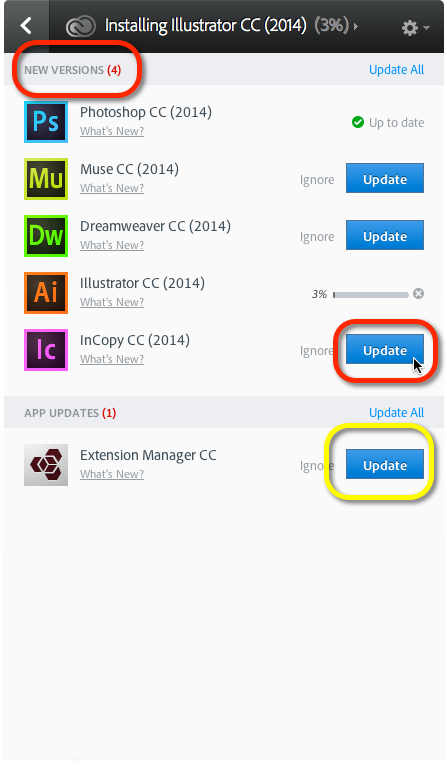
Here InCopy CC 2014 will be installed separately from my version of InCopy CC.
But Extension Manager CC will be updated.
The label “Update” is wrong. Notice the category at top called New Versions. This means that as I am installing Illustrator CC (2014), it will NOT overwrite my copy of Illustrator CC. I will be able to have both versions installed in my Applications folder. Similarly InCopy CC (2014) will not overwrite my version of InCopy CC.
This is vital for InDesign users, as documents created in CC (2014) must be saved as IDML so that InDesign CC can open them. So if I have a student who is using CC and sends me a file to change, I need to open it in CC or save it down as IDML if I open it in CC (2014).
Bottom Line:
Don’t panic at the “Update” button. It’s an “Install“.
This article was last modified on December 30, 2021
This article was first published on July 2, 2014
Commenting is easier and faster when you're logged in!

Recommended for you

Performing a Pre-Work Check
I had the opportunity the other day to open a file sent to me by someone I don...
Beware of local formatting and numbered lists
Using direct formatting with auto-numbered lists can change the appearance of th...
The scope of InDesign styles
Having trouble making sense of how Paragraph, Character, Object, Table and Cell...