




My e-mail went out of whack recently but not all the way out. I could receive mail but not send. And of course, it was late at night and I was on a deadline. All in all, a very frustrating situation, one that I bet has happened to you.
E-mail has been described as the "killer" application of the Internet. Mood killer might be a better description when something goes wrong with our ability to communicate. Worse, the needs of content-creation professionals to send and receive very large files often stretch the limits of ordinary e-mail accounts, gobbling up bandwidth and challenging restrictions on capacity.
So what was behind this contradictory happening and where was the problem located? And is there something that we can do to either avoid the problem or deal with it altogether? Troubleshooting such a problem isn’t hard but it requires some understanding of how e-mail works.
Mail Troubles
When we have problems with e-mail, the prime suspect would be a general problem with our broadband connection. However, my DSL connection was working fine and I was able to receive messages and surf the Web. Sending was the problem.
To understand the problem, it’s useful to understand how e-mail is handled by your Internet service provider and your mail application. If you’ve set up an e-mail account, you know there are different fields for sending mail and receiving mail to read. These actions are performed by different servers at your ISP.
There are two primary protocols for receiving mail: Post Office Protocol (POP) and the Internet Message Access Protocol (IMAP). I reckon most readers use POP mail, which was created to encourage off-line reading in the days before broadband connections that are always on. The scheme stores messages temporarily on a server, which are then downloaded by client software on the desktop computers. Once sent to the user’s machine, the messages are usually erased from the server.
On the other hand, the newer IMAP protocol lets users interact directly with messages on the server. The messages are kept on the server, although you can download them if necessary. Access to the e-mail is usually through a Web browser, even though many stand-alone mail readers can new handle both IMAP and POP accounts. The big advantage here is that you can access your new messages and stored mail from different computers, at your office or at a client’s site. And if you use a notebook and a desktop workstation, you don’t have to worry about syncing up folders.
IMAP also separates your messages from any data corruption that might occur when your machine crashes. It relies on the server administrator to maintain a backup of your messages rather than you (and who do you think is more likely to do the job on a regular basis?).
However, there is a downside to IMAP for many users, particularly content creators. Most POP mail services are more likely to support high-capacity mailboxes than IMAP setups.
Then there’s the reader on the host computer. I use Qualcomm Inc.’s Eudora to connect to more than a half dozen mail accounts on different servers. It works on both Mac and Windows platforms, offers very fast searching and stores mail files in standard text format (see Figure 1).
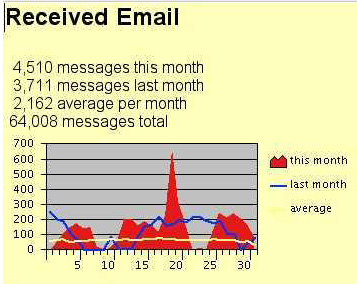
Figure 1: Eudora’s statistics page tracks your mail usage in a variety of ways, including how long you spend reading and sending messages. Here’s a view of a month’s receipt of messages, showing how the rate declines over each weekend and rises during the work week. And then there’s the recent spike in the middle of the month from the release of SoBig and Blaster worms.
The new Version 6 beta provides a spam filter and other options. Still, I admit that my primary reason for using the program is that I’m just a member of its installed base — that I’ve been using Eudora for years and changing to a competitor would require rebuilding long lists of addresses and groups.
Send Me a Message
Meanwhile, when I tried to send messages, each was bounced back unsent, and I received an error report saying that "relaying was denied." The Simple Mail Transfer Protocol (SMTP) mail server was blocking my messages from being sent. This was an important (and alarming) clue to the culprit.
In bygone days, Internet service providers were more free with their mail handling. They made it easy to send messages. For example, if I had accounts with different services, I could be logged into one service and still send a message through my account on another service. I would send the message to the SMTP server on the other account and it would pass it along. The server really didn’t do any checking to see if I really was the person my message said I was — it just sent on the message. This is called relaying.
With the rise of spam messages and e-mail worms, service providers have turned off this relaying function. It made it too easy for people to send thousands and thousands of messages; and junk mail marketers used the servers to send bogus mail that clogged the Internet (and our mailboxes). Hackers also used the function to target other networks with floods of mail, called a "denial of service" attack.
Nowadays, to send a message, you have to be logged into the network and use its outgoing mail server. Whether with a dial-up or broadband connection, the service identifies you as a bona member of the network and gives you permission to send messages. If you try to send a message via another server, you’ll receive a "relay denied" error report.
So you can understand my concern when I received this error message from my ISP. It was a contradiction. I was on the network but the outgoing mail server wasn’t identifying me as a member of the team. Ouch.
Return to Sender?
Of course, there’s always another thing it could be. Another way that ISPs can use to restrict e-mail messages is to insist that senders include a local Reply To, or return address.
Even though ISPs have turned off relaying message, there’s an easy way to make your messages appear to the receiver as if they come from different accounts. This is done through the Reply To field in most mailers. Or other mailers call it an e-mail address, different than the user account and domain settings for the actual service.
For example, I use SBC PacBell Internet DSL to connect to the Internet (and thus it sends my mail). Nevertheless, I can assign a different return e-mail address to a message; and to the receiver, the message will look as if it were sent not from PacBell but from another service. If you sneak look at the extended header information, however, you’ll see the real story.
While some ISPs now want a local domain return address on outgoing messages, that had never been a requirement before and I hadn’t received any warning of a change. Still, I checked this out as a potential problem the other evening, and outgoing mail still couldn’t be sent. Darn!
Unhappily for my deadline, this mail problem was on my ISP’s side, not on mine. There was nothing I could do to fix it.
Seeking Another Path
Faced with this realization, I had the choice to wait out the recovery of services (and it returned the next morning) or to find another way to send my files. Unluckily, the client doesn’t offer a FTP drop-off directory.
Certainly, if my e-mail was based around IMAP, I could connect to the mail services at my ISP and send the file. However, that’s a moot point.
There are two easy alternatives: find a free or paid e-mail service, and see if your ISP offers a Web mail interface to your POP mail services.
During the Internet bubble, many companies offered free accounts. Nowadays, in the clear light of profit, there are fewer choices for free mailboxes. And then there are restrictions on the size of incoming and outgoing messages.
Despite the changes in business model, a number of sites still offer inexpensive or free accounts. You can find an alphabetic list and reviews at Genki Productions’ EmailAddresses.com service.
One such site is RunBox Mail Manger, based in Norway (even though it’s all in English). The site provides e-mail services for a number of large companies and offers a mailbox for $29.95 a year. It has the usual stuff: Web access, spam filtering, and virus scanning. Of interest to content creators, RunBox recently expanded its mail limits and now permits messages up to 30MB.
A less-expensive path was simply to see if there was a Web interface to one of my current accounts. And there was. In fact, I was offered a choice between three different Web-based mail programs: Horde, NeoMail, and SquirrelMail.
I chose Horde, which sounded like the easiest one to set up and use — a primary consideration when computing late at night (see Figure 2). I set up the account in moments and was able to send my file without missing the deadline.
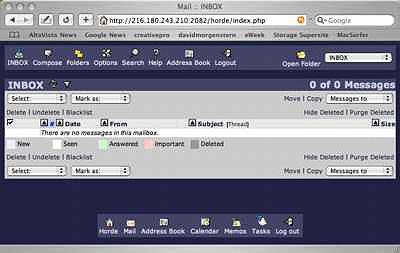
Figure 1: Horde offers an understandable and colorful interface to mail handling though a Web browser.
Content creators really shouldn’t wait until their mail services decide take a hike at a critical moment. In the lull before a deadline, find a Web service for your outgoing and incoming mail. As the saying goes: "When things are scarcer than you wish, a herring will have to serve as a fish." Late at night with a customer waiting for an assignment, you may have to settle for Web mail nutrition rather than the full course offered by your regular mailer.
Read more by David Morgenstern
This article was last modified on January 6, 2023
This article was first published on September 11, 2003
Commenting is easier and faster when you're logged in!

Recommended for you

Cool Frames from Photoshop Clipping Paths
As I mentioned (but didn't go into great detail about) in my May 2008 column for...

Scanning Around With Gene: Summer Wanderlust
I will admit to having a serious case of wanderlust this summer. It’s been quite...

New Contest! The Mystery of the Missing Frames
Every InDesign user knows that part of the job is figuring out what you’re seein...