




After a few cups of mulled wine, no doubt some of us chatted at length about our favorite "bands" at recent seasonal parties — Internet bandwidth and broadband access. And with a few more glugs of glog, perhaps we were actually glad to listen to that discussion.
Creative pros like to think we know all about bandwidth: that its performance comes and goes depending on the load placed on it and that more is better. All true.
Yet when it comes to your own Internet branding and workflow, bandwidth can take on a different meaning — one that can cost you time and money.
Bandwidth for the Masses
I was reminded of the wider meaning for bandwidth when reading Russell Shaw’s recent article on working with streaming video. He mentioned the need to recognize bandwidth issues when preparing streaming content for distribution over the Internet.
This is how we usually frame a discussion of bandwidth issues: the user experience when receiving a page or a video at a certain connection rate. If a viewer connects to the Internet via broadband service rather than a dialup modem, there’s a better chance of receiving more of the data stream and getting it more quickly. Of course, a majority of Internet users still access the Web via dialup modems (see figure 1).
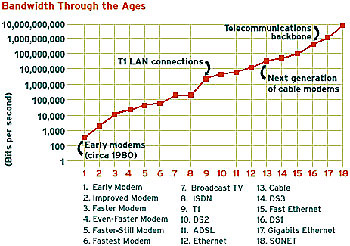
Figure 1: This chart shows the march of broadband from the early days: the 1980s. It’s from an article by developer Andrew Shuman looking at different broadband technologies. The left hand scale is in bits per second rising at an order of magnitude.
Shaw compared Internet traffic to an automobile freeway, with the packets of data being cars, and modems as on and off ramps. The analogy works well.
For example, traffic jams can take their toll on a quick trip to the mall. While broadband is theoretically faster than dialup, there’s often a difference between that expectation of speed and the actual user experience when receiving that video over the Internet. Theoretical maximum speeds are just that — theoretical; and a data stream can face many small slowdowns as it winds its way from the originating server, through traffic on each leg of its journey across the Internet, through your neighborhood and into your home or office.
Testing the Stream
I suggest that you test the performance of your Internet connection every once and a while. Sometimes your connection is bogged down and other times it may just seem slow — testing lets you see whether your perception of a slowdown matches reality. Frequent testing lets you see if there’s a pattern to slowdowns as well.
Here are a few test sites that I use:
- PC Pitstop offers a specific tests for different types of connections including dialup, DSL, cable modems, and even faster technologies. There are tests for download speed (how long it takes a file to reach your browser) and upload speed (how fast you can send a file), among others.
- There is a long battery of tests at DSLreports, and I appreciate its detailed explanation of the results. And the upload/download test offers an amusing comparison chart of your results (see figure 2).
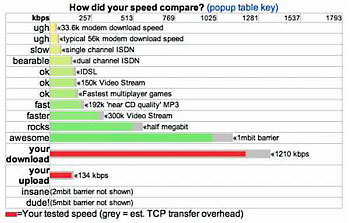
Figure 2: This chart shows the results from my broadband performance test at DSLreports. It says my download speed is 1,210,310 bits per second (bps), or "awesome." However, my upload speed wasn’t too hot, only 134 kbps or 134,453 bps. Still, I’m not running a Web server here at the office, so my primary concern is download performance.
- Some tests sites compare your results to other broadband users in your area (they require you to enter your snail-mail ZIP code). The speed test at Bandwidthplace said my 994.6-bps rate (really 994,613.69 bps but who’s counting) was "fantastic." Notice this result is a couple of hundred bps slower than achieved with the DSLreports test. This could be due to changes in the network load, a difference in the test procedure itself, or just voodoo.
Bandwidth by Any Other Name
While content creators usually consider bandwidth in relation to a viewer’s receipt of content, the meaning of bandwidth is much different to an electrical engineer or your Internet service provider.
Bandwidth is all about moving data from one place to another. The "band" refers to the range of electromagnetic frequencies used for a signal, analog or digital. How wide of a range for a given transmission technology will determine its bandwidth.
Engineers deal with bandwidth when moving data from the processor to RAM or from the system bus to the graphics chip. For those inclined, here’s a lengthy article that describes the calculation of analog and digital bandwidth and more.
Your ISP or hosting company also takes bandwidth into consideration when setting its business plan. Most of us don’t have a T1 or greater bandwidth line to quickly and reliably serve up Web pages or stream video to large numbers of viewers (and remember that all consumer and small business broadband packages have faster downstream performance than upstream speed). Instead, we rent that greater bandwidth from the provider by the month.
Most hosting packages come with some limitations for storage and bandwidth, and it’s easy to get the two figures mixed up. Every plan is different in the details and every hosting company figures those details in their own way.
To Beat the Bandwidth
But what does the word "bandwidth" mean to Web hosting service providers?
For them, bandwidth takes on the more general meaning: it’s any data moved in or out of your account, including e-mail messages, mail attachments, the delivery of your Web page to a viewer, and FTP transfers (if you set up an FTP service). One company’s entry-level package offers a 1.5GB of bandwidth, estimated to be about 25,000 unique page views of a 60 KB page.
Now, 1.5 GB of bandwidth sounds like a lot — and it is a lot for most folks — but the Internet needs of creative professionals could change the equation. It depends on your particular Web branding, workflow and clients.
Firstly, a Web page coming in at 60KB is mostly text, since a single, small JPEG image usually comes to 15KB to 25KB. It all depends on the size and the level of compression you use for the image.
However, content creators would more likely offer a site filled with larger graphics and more images, greatly increasing the total size of each page. And if you provide potential customers with links to download even larger images for evaluation (not a bad idea), then each of those downloads will count towards your monthly allotment.
Furthermore, as a producer of images as well as a customer of design work, I frequently send and receive versions of layouts and images during a design job. Now, sending a Web layout or small JPEG image as an attachment usually isn’t such a problem, since it’s designed to be small. On the other hand, a layout destined for print — even when sent in PDF — can weigh in at several megabytes a pop or more. That can add up.
Of course, video and audio are in a whole other league when it comes to bandwidth. Hence, the many notices on movie fan sites that the owners have increased their bandwidth allowance. Or more common, they removed the sound or video file that had swamped their previous allotments. But even a popular still image of 50KB to 100KB could overrun a service plan if it’s downloaded by thousands of viewers.
Read the Fine Print
Some hosting providers advertise so-called "unlimited bandwidth," which is often a batch of fine-print fees buried in the service agreement. They can take a bite out of your budget, just like those pesky service fees on our checking accounts.
For example, one hosting plan offers what seems to be an astounding 20GB of bandwidth per month. However, upon closer inspection, the company details the exact number of e-mail messages and Web page transfers allowed under the plan. And it’s low, especially if you subscribe to several e-mail message lists.
If your allotment is exceeded for either category, then a fee is billed to your account. These charges can add up quickly and frequently apply to the entire billing period, even if the allotment was exceeded only for a day or two.
Look carefully at the alternate plans offered by your service provider. Many hosting vendors offer package deals for two or five domains. Often these plans are only a dollar or two higher than the entry-level, single-site plan, yet provide double the storage space and bandwidth.
Page-Zone, for example, has single domain package for $3.48 a month. The two-domain package offers 200MB of storage and 3GB of bandwidth (twice the level of the entry-level plan), yet costs only $4.95 a month. And the bandwidth can be shared dynamically between the two domains. There are many providers with similar packages, so shop around.
I suggest that it’s better for content creators to plan for more rather than less when it comes to Internet usage. As the venerable sage the Chofetz Chaim said: "Miserliness is an expensive habit." Spending a few extra bucks a month may let you avoid all those special charges.
Read more by David Morgenstern.
This article was last modified on January 6, 2023
This article was first published on January 2, 2003
Commenting is easier and faster when you're logged in!

Recommended for you

CS5-Compatible Version of Smart Styles Now Shipping
Press Release WoodWing Software, a leading supplier of innovative cross-media pu...

Beware the Placed InDesign Stitching Bug
Soon after InDesign CS3 was announced, I posted about the wonderful new ability...

Before&After: How to Make Event Promotion Graphics Resonate
When designing materials for a bluegrass music event, you can set the stage with...