




My demo fever has abated somewhat (finally) a few weeks after the Seybold San Francisco conference and expo. In hindsight, away from the glare of the show floor, I find myself returning to one particular demonstration: CUPS printing under Mac OS X in the Apple keynote. Although perhaps the most understated demo of all, without a hint of pizzazz, the support for CUPS revealed a strength in the Unix underpinnings of the new Mac operating system, one that should hold practical benefits for content professionals.
One bad rap about OS X has been printer support (or rather, its lack), especially for older professional-level printers and large-format devices. For consumers picking among the many dirt-cheap USB printers, there’s no problem, but suppose you bought an Epson Stylus Pro 9000 for $7,000 just a couple of years ago? Now discontinued, the 9000 is still a serious wide-format printer (see figure 1), and of course, owners would want to operate it under the new OS. But there’s no OS X-specific driver for the printer; it only works under Mac OS 9.
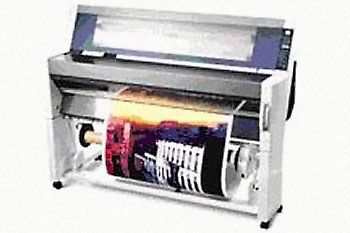
Figure 1: Epson’s product page for the Stylus Pro 9000 warns readers that the printer has been discontinued. According to the printer’s support page, its latest V.6.3cE driver runs on Mac systems up to and including Mac OS 9.x. But not Mac OS X. What to do?
This missing driver situation has certainly held back many content professionals from making the transition to Apple’s new OS.
However, instead of asking vendors to provide new OS X-savvy printer drivers for all their orphaned hardcopy devices, Apple now offers a rather roundabout solution, one that takes advantage of OS X’s Unix technology: support for the Common Unix Printing System (CUPS), Gimp-Print drivers, and the Ghostscript PostScript interpreter.
Down in Your CUPS
Creative professionals (like most computer users) take printing for granted. Most of the time, we simply plug in a printer and it works. Still, such easy printing isn’t necessarily a given, whether from an application (such as Macromedia Fireworks, which omits the print command) or from a computing platform such as Unix.
Often, the reason for such lackluster support for a hardware product is a missing driver. All peripherals require drivers, or small pieces of code that tell your host computer how to communicate correctly to a connected hardware device.
When a driver is missing, the computer can’t connect to the storage device, modem, or printer. If the driver is incorrect or corrupted, then the communication can be garbled. Operating systems often ship with a number of drivers; some are generic versions that only support a base functionality in a product or model.
The work of a driver is very low-level, carried out in the basement of the operating system. For OS X, that layer is called Darwin, or the Open Desktop (see figure 2). It really comprises many services, modules, and pieces, including many so-called Open Source projects, which let programmers from around the world collaborate or expand the code.

Figure 2: This chart, from an Apple developer page shows OS X’s basic structure. The stuff you actually see on the screen, the Aqua interface, is that long blue bubble on the top. Below in yellow are the supported programming environments or API (application programming interfaces). Further down are the basic imaging technologies (in green) and then everything else, dubbed Darwin. Really, the chart should be thought of as a digital iceberg; the Darwin part is really big.
One of these projects, CUPS, was added to the Jaguar update to OS X. As its name describes, CUPS provides Unix systems with a standard, low-level way to print files and manage printing. The software comes standard with a number of the Linux distributions.
In the early days of Unix, most printing was output to line impact printers using the LP daemon (that’s Unix geek speak for a process). Unix developers also authored PostScript interpreters to enable high-quality graphics to laser printers.
CUPS goes a step further with support for the new IPP (Internet Printing Protocol) as well as letting users access shared Windows printers under the SMB (Server Message Block) protocol. On the PostScript side, it supports PPD settings files.
This article was last modified on January 6, 2023
This article was first published on October 3, 2002
Commenting is easier and faster when you're logged in!

Recommended for you
Creating a PDF from InDesign’s Print Booklet Feature
A step-by-step guide to creating a PDF of printers spreads with Print Booklet.

Damn You, Art School
It takes more than a good education to succeed in a any field. It takes real-wor...
Scanning Around With Gene: The Photographic Moment of Truth
For several years in high school I worked part time at a small pharmacy that sol...