




TypeTalk is a regular blog on typography. Post your questions and comments by clicking on the Comments icon above. If Ilene answers your question in the blog, you’ll receive one Official Creativepro.com T-Shirt!
Q. When I reopen a document in InDesign, I get a missing font alert that says that the Times (TT) font is missing and a substitute font will be used. I don’t even use Times, so why is this happening?
A. This annoying problem has an easy fix. Even if you never use style sheets, therein lies the problem: The [Basic Paragraph] style attributes contain the default for a document, which can somehow sneak into a document, if only for a space. That space, although invisible, contains a font style nonetheless.
The pesky missing Times (TT) as it appears in InDesign’s Missing Font dialog box.

To eliminate this problem, you have to change this default for the document in question, and for all future documents.
Here’s how:
1. In InDesign, go to Type > Paragraph Styles.
2. This opens the Paragraph Style Options dialog box. Select and click on Basic Character Formats from the menu on the left.
3. Change the default Font Family from [Times (TT)] to a default on your system, such as Arial.
When you follow these steps with a document open, it will affect only that document. If you follow these steps with InDesign active but no document open, you will affect all future new documents.
The fix is to change the missing font under Basic Character Formats in the Paragraph Styles Option dialog box to one that is on your system, as shown below.
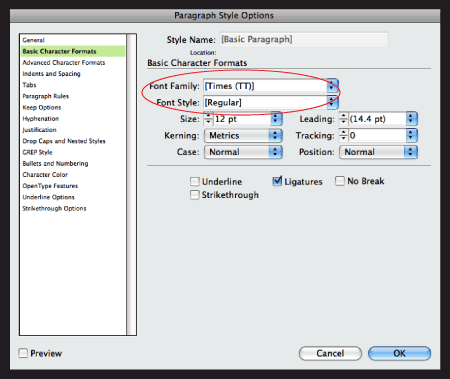
Theoretically, you should be able to change the default font via InDesign’s Character Palette, but in my experience, the style sheet method is a more reliable way to avoid the nasty missing Times (TT) alert.
Love type? Want to know more? Ilene Strizver conducts her acclaimed Gourmet Typography workshops internationally. For more information on attending one or bringing it to your company, organization, or school, go to her site, call The Type Studio at 203-227-5929, or email Ilene at in**@***********io.com. Sign up for her e-newsletter at www.thetypestudio.com.
This article was last modified on January 3, 2022
This article was first published on April 1, 2009
Commenting is easier and faster when you're logged in!

Recommended for you
The Fashion Fonts of Moshik Nadav
If you don’t think an inanimate entity can be sexy, you might change your...

The Typography & Design of Alexander Isley
I’ve been a huge fan of designer Alexander Isley ever since I saw his presentati...
Cyril Burt: Putting Readability to the Test
How’s this for a typographer’s mission statement: to provide the swiftest access...