



Let’s see, so far I have posted about my dislike for the Gradient panel, the spell checker, and a nasty bug. Please believe me that I do love working with this application. Well, if you’ve seen the movie, you know that. I’m just on a roll, I guess. So here’s two more buggy bits to be aware of in CS4 (both are just annoying, not deal-breakers, like the master page items bug, imho).
Book Panel Blindness
On the Mac, when you have a free-floating document window, you are supposed to be able to drag the icon from the document title bar into a Book panel to add that document to the Book. But in CS4, the Book panel doesn’t always seem to be aware of this.
Try it: create a new document and save it. Create a new Book. Try to drag the document’s title bar icon into the Book. No response, right? Here’s the weird workaround: drag the document window down on your screen until it is below the Book panel. Now drag the title bar icon. It goes into the Book as expected. Apparently, you have to go in thru the back door. Going in from any other direction won’t work.
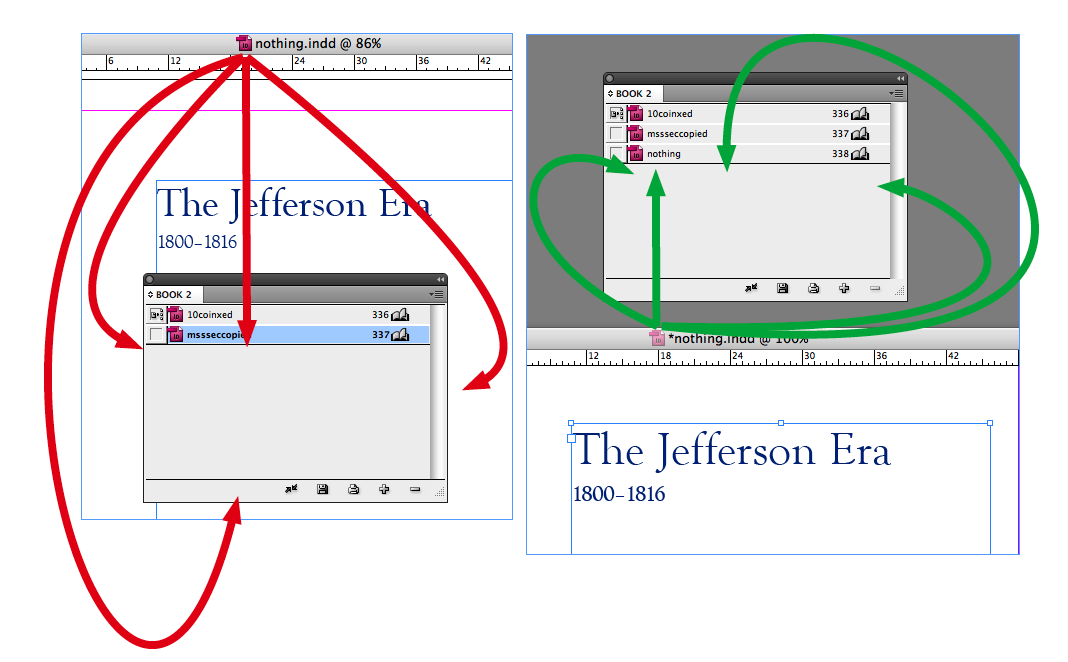
One other thing: if you remove the document from the book, you can add it back in by dragging regardless of where the document is onscreen. It seems to “remember” which books it has been a part of. But you still cannot add that document to other books without positioning it beneath them.
Swatch Panel Out of Focus
There have been a couple of posts here at InDesignSecrets about the fun of selecting swatches from the keyboard: one by me, and one by Anne-Marie.
Too bad it doesn’t work in CS4. You can still use the arrow keys to navigate swatches when the list has focus, but typing the letters of a swatch name won’t select it. Also, the little visual cue, the black line around the swatch list is gone.
Yep, just call me Mr. Sunshine ; )
This article was last modified on December 19, 2021
This article was first published on November 5, 2008
Commenting is easier and faster when you're logged in!

Recommended for you

Moving Pages to Another Document Doesn’t Have to be a Drag.
For the longest time moving pages from one document to another was an exercise i...
Figure Numbering in InDesign (and cross-references to them)
How do you set up automatic figure and table numbers? And how do you point to th...
InDesign Eye Candy, part 1: In Gravity’s Shadow
Why should all the Photoshop and Illustrator kids have all the fun, when you can...