Hi All
I'm just starting in the world of InDesign after about 10 years of using Quark Xpress (version 5 the whole time…) and am currently teaching myself as much as possible while remaking various recurring pieces of work so I can use InDesign infuture.
One of the pieces of work includes several pages of tables with a particular style, which is fairly easy to manually create but having experimented with the capabilities of cell/table styles etc I'd like to be able to use those tools to make the tables much more quickly.
I managed to get this set up for the simple tables but am having a bit of a problem when it comes to automatic alternating fills when with regard to combined cells and rows
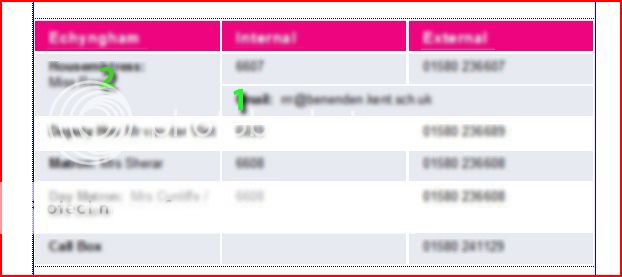
Above is an example of the tables I am trying to create and the are which is causing me a problem…the two rows which are merged…
The cell numbered 2 is made up of cells from two rows which are merged.
The cell numbered 1 is the remainder of the second row, merged into one cell.
The problem I am having is that when it comes to using the automatic alternating fill, it will fill the top line (including all of the cell numbered 2) but wil not fill the cell numbered 1 as it sees it as a separate row (which of course it is)
Is there anyway I can get the same layout as I have now but have both rows counted together so the auto filling works as I want?
ALternatively, could I set up two sets of cell styles, one with the blue tint so I could just select the rows I want and hit that cell style to tint them quickly rather than having to select the row, then the colour then set the tint percentage? (does it work like that?)
ANy thoughts or advice would be much appreciated.



.


