Back

If your email is not recognized and you believe it should be, please contact us.

  • You must be logged in to reply to this topic.Login

Remove White space around MathType eps

Return to Member Forum

  • Author
    Posts
    • #90009
      Bala S
      Participant

      While placing the MathType eps in InDesign, we are getting unwanted white space around the equations which leads additional spacing issue for Inline equations. Can anybody suggest that how to get the MathType eqns without white space? or is there any other solution?

      Note: At present, I am reducing 2 points (left and right side) of parent text frame to avoid the white space

    • #90024

      I can’t think of anything off hand. Perhaps there’s a setting in MathType that controls how much background space there is.

    • #90025
      Bala S
      Participant

      Hi Dwayne Harris,

      Thanks for your reply. However, I can’t find out where to control space in MathType setting. Could you please help me to find out?

    • #90026
      Peter Kahrel
      Participant

      Bala — The only way to remove that space is to crop manually all the EPSs in InDesign. MathType rounds the EPSs bounding box up to whole points and adds (at least) 1 to make sure that no part of an equation is clipped. There is no way (in MathType or in InDesign) to crop the frames automatically.

      Peter

    • #90028
      David Blatner
      Keymaster

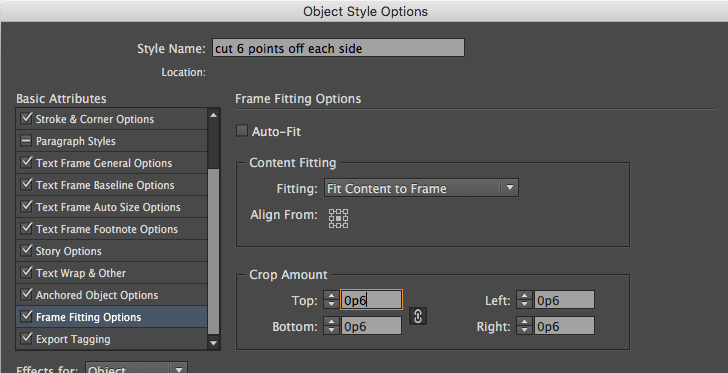
      I think you could probably apply an object style to the frame, and use the Frame Fitting Options to force it to crop the edges by 1 or 2 points. For example, set up an object style like this (see below) and then when you apply it, it will resize the graphics in the frame:

      • #90040
        David Blatner
        Keymaster

        WAIT! It was too early in the morning when I made that… do not use “Fit Content to Frame” because that may scale the image disproportionally. Instead, use “Fit Content Proportionally” in the Fitting pop-up menu.

    • #90030
      Peter Kahrel
      Participant

      Where is the thumbs-up button?!

      • #90031
        David Blatner
        Keymaster

        LOL! Yes, we need thumbs up/down buttons here, don’t we? I’ll add that to our list of improvements we’d like to make to the forums.
        I’d give your knowledge of MathType a +1, too. Thank you, Peter.

Viewing 5 reply threads
  • The forum ‘General InDesign Topics (CLOSED)’ is closed to new topics and replies.
Forum Ads