Back

If your email is not recognized and you believe it should be, please contact us.

  • You must be logged in to reply to this topic.Login

Paragraph rules: fixed distance above text.

Return to Member Forum

  • Author
    Posts
    • #115887

      Hi there… i couldn’t find the answer to this question in the forum, so…

      I would like to create a rule above a heading that has always the same distance between the top of my heading font and the paragraph rule, independently the heading font size. Let me explain.

      Say i have a heading font size of 72 pt and a heading rule above with an offset of 24 mm. When i change the heading font to 36 pt the distance between the top of the heading font and the heading rule increases, because the offset setting is still 24 mm. To keep the distance the same i need to change the heading rule offset. Is there a way or a work around to keep the distance always the same, independently the heading font size, without changing the heading rule offset manually every time?

      Hope you understand what try to achieve! Thanks!

    • #115889
      David Blatner
      Keymaster

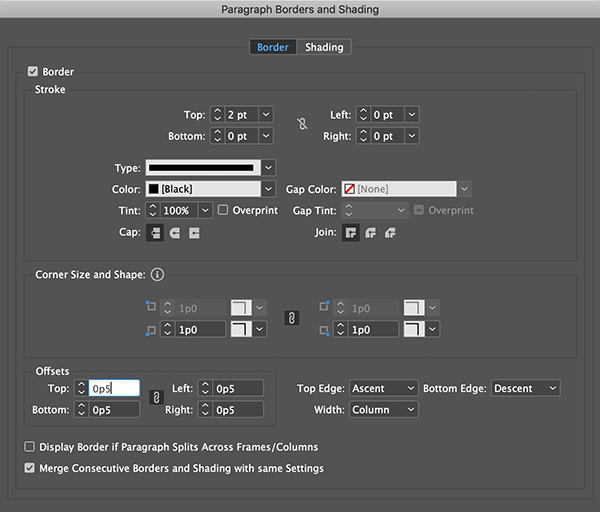
      Instead of a Paragraph Rule, you could use Paragraph Border and set it to a border just on the top side. Then set the offset to Ascent:

    • #115895

      Hi David,

      To be truly “precise” … the way with the “Paragraph Border” setting doesn’t work!! But it could be “acceptable”.

      Best,
      Michel, for FRIdNGE

    • #115934
      Vinny –
      Member

      Why not using different paragraph styles as per your needs?

Viewing 3 reply threads
  • The forum ‘General InDesign Topics (CLOSED)’ is closed to new topics and replies.
Forum Ads