Back

If your email is not recognized and you believe it should be, please contact us.

  • You must be logged in to reply to this topic.Login

Multiple tables side-by-side

Return to Member Forum

  • Author
    Posts
    • #82742

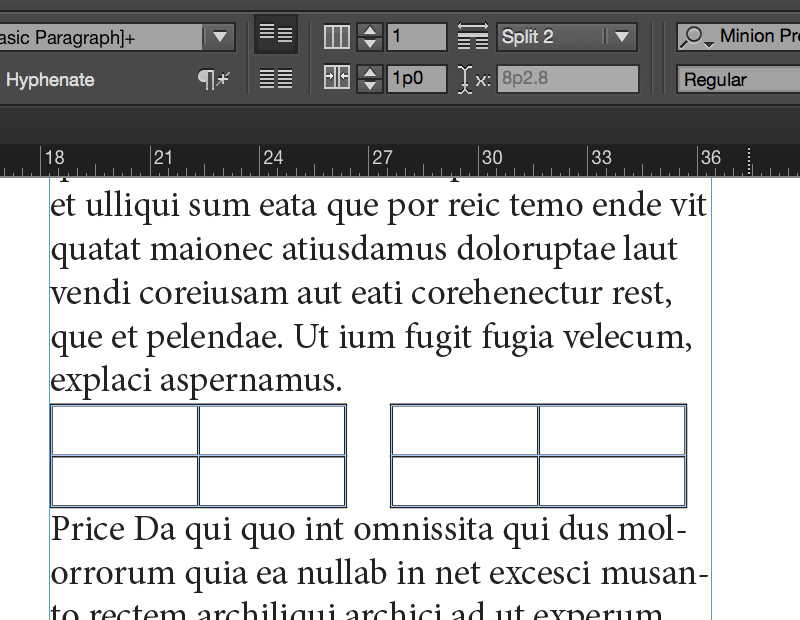
      Is there a way to have two or more tables in a text frame in a horizontal arrangement? For example, if I create a table, copy it, and then paste the new table into the same text frame, ID will always force the new table below the first. I don’t want to create a new table just to contain the others, and using text frame columns is not an option. Suggestions?

    • #82743
      David Blatner
      Keymaster

      Yup! You can make two tables, then select both paragraphs and set them to Split 2. That will split the column into 2, with one table on the left and one on the right.

      Neat huh? I should write that up as a blog post… :-)

    • #82791

      Thanks, David. That worked pretty well. Problem now is that since the first table has more rows than the second, and the bottom rows are jumping over to the next “column”. In addition, the tables are not of equal width, so table 1 overlaps table 2.

      I cannot figure out how to add images to this post.

    • #82792
      David Blatner
      Keymaster

      I think we’re going to run this in tomorrow’s “tip of the week” email, so look for solutions there. (Spoiler: There’s no good way to deal with tables of unequal width.)

      As for uploading images to the forum: you’d need to upload it somewhere like imgur and then post a link here.

    • #82793

      OK, cool. Putting table 2 into a text frame, then pasting that into the original frame as an anchored object works, but keeping the two tables aligned is a chore.

      Thanks for your time, David. You are a great resource for us all!

    • #82803
      Tom Pardy
      Member

      Since I am still using InDesign CS6, I may have misunderstood what has been said already in this thread.

      But it occurs to me that a possible solution would be to have a simple 2-cell table that runs the full width of the page. Then build a new table in the left cell and another in the right cell. If the simple 2-cell table had a cell inset of zero (except, perhaps, as outlined in my next paragraph) and a stroke weight of zero, then it would not appear in print (or in a .pdf) and the two additional tables would appear to float within its space.

      If you want there to be a “gutter” between the two additional tables, then the cell inset to the right of the left-hand cell and to the left of the right-hand cell could be adjusted to create the necessary gap between the two additional tables.

      From having tried it out, I have learned that you have less headaches if you set up ALL the details of the initial table before adding the other two tables. Otherwise you find yourself going back and adjusting things too many times!

    • #82840

      That does work. It just seems odd that you can’t easily copy/paste tables and have them line up side by side.

    • #84789
      Anonymous
      Inactive

      I have a table in the adjacent columns are not aligned. Why do you think?

Viewing 7 reply threads
  • The forum ‘General InDesign Topics (CLOSED)’ is closed to new topics and replies.
Forum Ads