Back

If your email is not recognized and you believe it should be, please contact us.

  • You must be logged in to reply to this topic.Login

CP from Word format issues

Return to Member Forum

  • Author
    Posts
    • #63611
      digs9
      Participant

      Hi all-

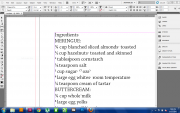
      Can somebody please point out to me what's happening to my text? I'm copying/pasting from Word and I've spent hours troubleshooting (to no avail. I've tried other fonts and GREP styles don't seem to take either.) Here's a link to a picture of my screen:

      imagebam.com

      All I'm really trying to do is get my fractions to behave, but I never expected the commas, the parentheses, even the basic numeral format to have been so…altered. I'm just sick of banging my head against the wall. I can't tell if it's a setting in ID that I'm unaware of or even why paste without formatting is unavailable or what the problem is.

      If anyone can point me in the right direction, I sure could use the help.

      As always, any insight is appreciated…I appreciate the time spent trying to help.

    • #63614
      David Blatner
      Keymaster

      copy and paste is the worst way to get formatted text (or text with any special characters) into InDesign. I strongly recommend saving it as a .doc or docx or .rtf and then using File > Place in InDesign.

    • #63615
      digs9
      Participant

      Thanks David. I think I'm stuck with C&P as I have to segregate my already saved recipes; I have them in blocks of 20 and they span the gamut of subject matter. I think that I'll get by by NOT using the Opentype fraction option and then subsequently using a number of Find/Change passes to convert (fr'instance) 1/3 into ?.

      I very much appreciate this boards' membership and certainly your own guidance.

      Thank you.

      -digs9

    • #63616

      Your image was a bit too small to recognize the problem, but this remark speaks volumes;

      I'll get by by NOT using the Opentype fraction option ..

      It seems you are applying this option to your entire text. Don't; just apply it to the numbers that are supposed to be formatted as fractions.

    • #63617
      Bob Rubey
      Member

      Perhaps one of Dan Rodney's scripts would help? There's a free and a Pro version.

      https://www.danrodney.com/scrip…..ction.html

Viewing 4 reply threads
  • The forum ‘General InDesign Topics (CLOSED)’ is closed to new topics and replies.
Forum Ads