



This tip was sent to Tip of the Week email subscribers on September 17, 2015.

Sign up now and every week you’ll get a new InDesign Tip of the Week and Keyboard Shortcut of the Week, along with roundups of new articles at InDesignSecrets and CreativePro, plus exclusive deals sent right to your Inbox!
Just scroll all the way down to the bottom of this page, enter your email address, and click Go! We’ll take care of the rest. Now, on with the tip!
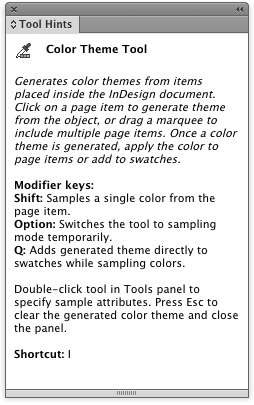
If you’re just learning InDesign (or you’ve been using it forever but still like to be reminded of what the application can do), open the Tool Hints panel (Window > Utilities > Tool Hints).
It will display how your currently selected tool works, related keyboard shortcuts, and other tidbits of useful information.
This article was last modified on July 25, 2019
This article was first published on September 22, 2015
Commenting is easier and faster when you're logged in!

Recommended for you

How to Number Pages of a Spread With a Range
Editor’s Note: this post was excerpted from Jeff’s handout from Crea...

Where is my font?
Keith tackles a thorny issue where certain styles of a large type family seemed...
The Universal Shortcuts
InDesign, Illustrator and Photoshop are similar, but what shortcuts do they shar...