



InDesign’s Recent Fonts feature has been around since CS6, allowing you to quickly access up to 50 of your most recently used fonts from the top of the menus in the Control and Character panels.
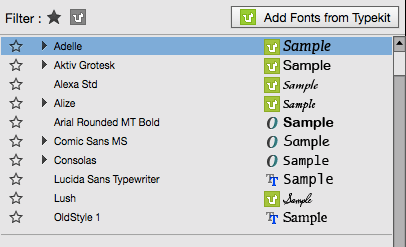
But some folks don’t like the fact that this feature can make it harder to browse through fonts you haven’t used recently.
If you open a font menu when you have some text selected, the current font will be selected in the recent fonts part of the menu (at the top). So you have to scroll back down to see it in the context of all your other fonts. This can be particularly annoying if you’re just browsing through a long list of fonts, not knowing yet which one you want to apply.
So the solution here is to simply turn the Recent Fonts feature off, by going to Type Preferences and setting the value to zero.
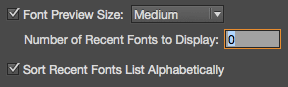
InDesign will still keep track of your recent fonts, so they will appear when you set the value back to something higher than zero. And in the meantime, you can browse and apply fonts without being taken back to the top of the fonts menu every time.
Note that you can avoid the problem with Recent Fonts if you use the search feature in the Fonts menus, by typing part of the name of the font you want. But again, search won’t help you if your goal is to smoothly browse through your fonts.
This article was last modified on November 23, 2022
This article was first published on November 11, 2014
Commenting is easier and faster when you're logged in!

Recommended for you

Tip of the Week: Customizing the Links Panel
How to apply colors via the keyboard by navigating swatches in InDesign.

Tip of the Week: Rotation–Clockwise or Counter-clockwise?
This tip was sent to Tip of the Week email subscribers on June 26, 2014. Sign up...
TypeTalk: Timesaving Tips for Designing with Type, Part 1
There is never enough time when working on a design project. Even your best effo...