



This tip was sent to Tip of the Week email subscribers on October 22, 2015.

Sign up now and every week you’ll get a new InDesign Tip of the Week and Keyboard Shortcut of the Week, along with roundups of new articles at InDesignSecrets and CreativePro, plus exclusive deals sent right to your Inbox!
Just scroll all the way down to the bottom of this page, enter your email address, and click Go! We’ll take care of the rest. Now, on with the tip!
You can create some amazing graphics with InDesign’s transparency effects, but you might struggle at times just to choose the right settings because you can’t hide the edges of the object you’re working on. The frame edges and control handles get in the way and make it hard to evaluate your work.
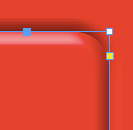
So some folks apply an effect, then deselect the object to see the effect clearly, then re-open the Effects dialog box, tweak the settings, etc, etc, etc. This is a pretty frustrating way to work, and fortunately there’s a better alternative.
In the bottom right corner of the document window, there’s a button you can click to split the layout view.
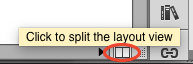
Zoom in on the object you want to work with. Click the button to split the view. Then in one view you can select the object, and the frame edges will not show in the other view. Now open the Effects dialog box (from the FX menu in the Control panel or Effects panel). Adjust the settings as you like, and keep an eye on the other half of the split window to evaluate your work in progress.
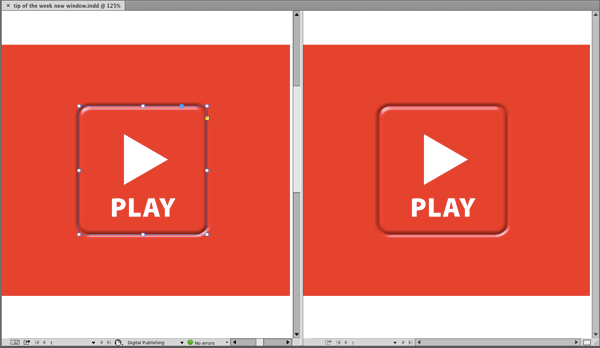
PS: if you like the button effect, here’s a snippet of it that you can place and use (or adapt) for your own documents: Button FX.
This article was last modified on July 25, 2019
This article was first published on October 27, 2015
Commenting is easier and faster when you're logged in!

Recommended for you

Tip of the Week: File Instant Bug Reports & Feature Requests With Quick Apply
This InDesign tip on how to file instant bug reports and feature requests w...
InDesign Magazine Issue 123: Nonfiction Design
We’re happy to announce that InDesign Magazine Issue #123 (July 2019) is no...
Tip of the Week: Showing Hidden Panels
Sign up for the InDesign tip of the week to get a new tip, roundups of new artic...