



This tip was sent to Tip of the Week email subscribers on June 11, 2015.

Sign up now and every week you’ll get a new InDesign Tip of the Week and Keyboard Shortcut of the Week, along with roundups of new articles at InDesignSecrets and CreativePro, plus exclusive deals sent right to your Inbox!
Just scroll all the way down to the bottom of this page, enter your email address, and click Go! We’ll take care of the rest. Now, on with the tip!
Did you ever want to collect and package just some of the images or fonts from a document? You can exclude items by putting them on a hidden layer, and deselecting the option to include hidden content.
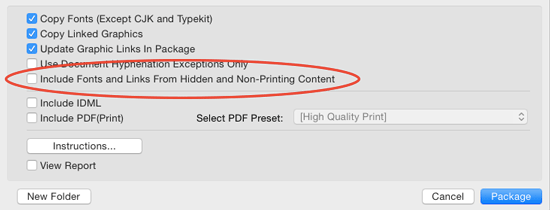
This can also be helpful to remember if you’re trying to understand why InDesign didn’t package certain fonts or images that you know were used in a document.
This article was last modified on August 8, 2019
This article was first published on June 17, 2015
Commenting is easier and faster when you're logged in!

Recommended for you

Tip of the Week: Keeping Registration Out of Your Way
Sign up for the InDesign tip of the week to get a new tip, roundups of new artic...
Now available: JavaScript for InDesign, 2nd Edition
Learn how to harness the power of scripting in InDesign. And take advantage of a...
Adding the Last Page Number in a Book to Text
It’s probably a bad idea to write blog posts on an empty stomach because a...