



This tip was sent to Tip of the Week email subscribers on August 27, 2015.

Sign up now and every week you’ll get a new InDesign Tip of the Week and Keyboard Shortcut of the Week, along with roundups of new articles at InDesignSecrets and CreativePro, plus exclusive deals sent right to your Inbox!
Just scroll all the way down to the bottom of this page, enter your email address, and click Go! We’ll take care of the rest. Now, on with the tip!
To create a preflight profile that will expose any unwanted text overrides, go to the Preflight panel menu (Window > Output > Preflight), or the preflight menu at the bottom of the document window, and choose Define profiles.
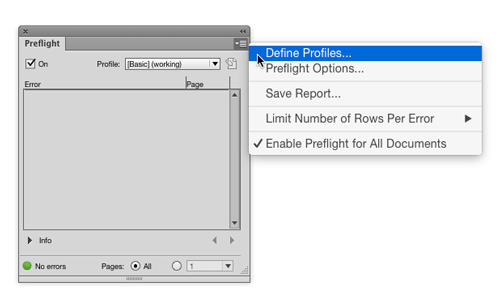
In the Preflight Profiles dialog box, click the + button to create a new profile and give it a name.

In the TEXT preflight options, select Paragraph and Character Style Overrides. You can also tell InDesign to ignore certain kinds of overrides, like color overrides, language overrides, etc, that you’re not worried about.
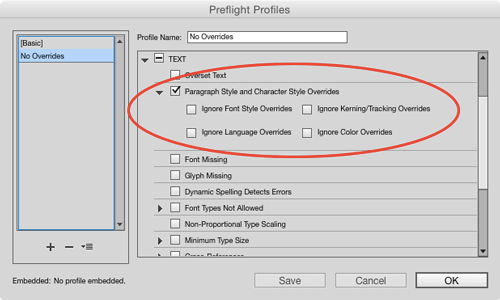
Enable any other preflight options you want to include, then Click OK and then be sure to choose your new profile in the panel Profiles pop-up.
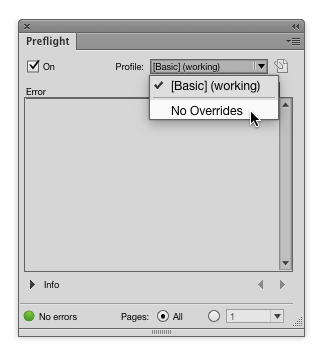
Now, no unwanted overrides can escape your notice. And you don’t have to search through your document for them.
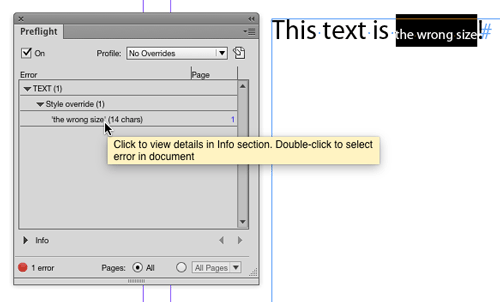
You can even get a report in plain text or PDF listing all the text style overrides in your document.

This article was last modified on July 25, 2019
This article was first published on September 1, 2015
Commenting is easier and faster when you're logged in!

Recommended for you


CreativePro Tip of the Week: Photoshop Blend Mode Shortcuts
This CreativePro Tip of the Week for Photoshop blend mode shortcuts was sent to...
Tip of the Week: Showing Hidden Panels
Sign up for the InDesign tip of the week to get a new tip, roundups of new artic...