



This tip was sent to Tip of the Week email subscribers on December 10, 2015.

Sign up now and every week you’ll get a new InDesign Tip of the Week and Keyboard Shortcut of the Week, along with roundups of new articles at InDesignSecrets, plus exclusive deals sent right to your Inbox!
Just scroll all the way down to the bottom of this page, enter your email address, and click Go! We’ll take care of the rest. Now, on with the tip!
Now that you can use InDesign’s animation tools to bring content alive in EPUB and Publish Online projects, it’s worth spending some time getting acquainted (or re-acquainted) with the cool stuff you can do. For example, did you know you can convert just about any paths into custom motion paths that define the behavior of animated objects?
In order to help our brave little dot get out of this maze, you can draw an escape route with the Pen tool.

Then select both the dot and the path you just drew, and at the bottom of the Animation panel, click the button for Convert to Motion Path.
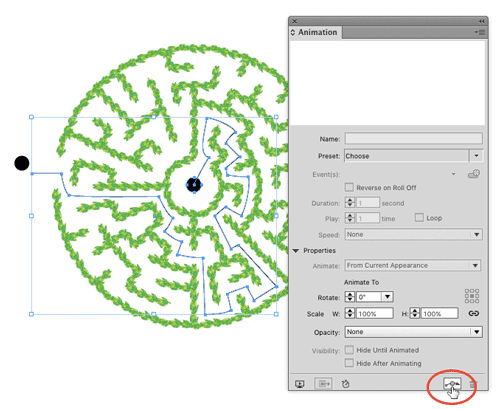

From there, you can tweak the duration, timing, trigger event, etc., or click the motion path and edit is as you would any path, using the Pen tool and selection tools, until you have the perfect path to unite these two lonely objects in holy dotrimony.

Bonus tip: want to convert a motion path back to a regular path? Don’t click the trash can on the Animation panel. That deletes the path. Instead, click the motion path to select it, then cut it and paste it in place (Command+Shift+Option+V on Mac Ctrl+Shift+Alt+V on Windows).
This article was last modified on July 25, 2019
This article was first published on December 15, 2015
Commenting is easier and faster when you're logged in!

Recommended for you

Tip of the Week: Redefining Styles
Sign up for the InDesign tip of the week to get a new tip, roundups of new artic...

Photoshop Tip: Pasting into a Selection in Photoshop
Learn how to create layers with layer masks with Photoshop's Paste Into command.
Tip of the Week: Placing Snippets
This tip was sent to Tip of the Week email subscribers on March 12, 2015. Sign u...