


The Nikon D1x: An Exceptional Digital Camera for Pros


Higher Resolution, Better Color
The heart of the D1x is a redesigned, 12-bit CCD (23.7×15.6mm) about 2/3 the size of 35mm film. CCD resolution is twice that of the D1 (in the horizontal, though not the vertical direction: 4028×1324 pixels instead of 2014×1324). This means that D1x pixels are not square like the D1 or D1h, but rectangular. In-camera processing converts 4028×1324 pixels (5.33 million usable pixels) into a 3008×1960-pixel image (5.9 megapixels). Vertical pixel interpolation and horizontal compression adds more accurate detail, and Nikon asserts that little or no image degradation is visible.
It’s tough to argue with the math, judging from the results (see figure 4).

Figure 4: Original set (middle). Image shot as 7.7MB RAW file (top) and a 17.3MB TIFF (bottom). All sharpened with 300% Unsharp Masking, 67% Fade, and saved as JPEG Maximum quality.
The new D1x CCD produces larger files and doubles computer storage requirements over the D1. Opening and saving files and processing times on my G4/400 with 7200 RPM hard drive slowed considerably. An updated PowerMac G4 (800 MHz to 1GHz) with an Ultra-SCSI hard drive may be in order.
Nikon has improved noise suppression in the D1x and D1h; and the high-ISO shadow noise and banding of the D1 has been reduced. A low-pass filter in front of the CCD subtly reduces sharpness, but it also limits objectionable color aliasing and moire´ effects otherwise visible on high contrast edges or detailed patterns. Color detail recorded by the CCD is vivid with excellent saturation, although my tests showed the D1x produced over-saturated red values under some lighting conditions, resulting in a loss of subtle highlight and shadow details. Shooting under a red spotlight at a rock concert could be problematic, for instance
In addition to sRGB, the D1x and D1h can save images using the Adobe RGB (1998) color space, which provides a wider dynamic range for print work.
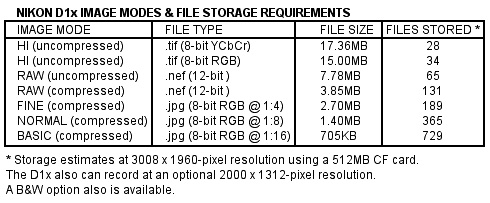
The D1x, D1h and original D1 all save files in a variety formats: two versions of TIFF (.tif), three levels of JPEG (.jpg) compression and a RAW (.nef) format (uncompressed). The new models also offer a compressed RAW option (see figure 5). I usually use the uncompressed RAW option for the smaller file sizes and for its post-processing flexibility.
This article was last modified on January 18, 2023
This article was first published on April 16, 2002
Commenting is easier and faster when you're logged in!

Recommended for you

Heavy Metal Madness: Put on a Happy Face!
When I met my wife Patty back in the very early ’80s, it made perfect sens...

Heavy Metal Madness: Men Live In a Vacuum… Tube
My last column, which addressed the gender gap in housework duties, drew a numbe...
How to Make a Cinemagraph in Photoshop
Cinemagraphs are images in which just a portion is animated on an endless loop....