




ImageReady is still along for the ride and has had its version number bumped up to match Photoshop’s. ImageReady 7 also supports the latest operating systems and offers an improved, hopefully more intuitive, Rollover palette. Both Photoshop and ImageReady have gained Web graphics-optimization enhancements, such as the capability to remap and dither transparencies and to prioritize text and other vector artwork, affording crisp output of these areas for the Web while keeping file sizes down. A new level of anti-aliasing for text, Sharp, has been added to the three existing levels. Blending modes also have some new additions, such as Pin Light and Vivid Light, and have been grouped differently in hopes of making each one’s effect clearer to understand. The new Auto Color command effortlessly eliminates color casts out of photos. Although most of these features and enhancements can be defined as minor, it’s difficult to say what kind of impact they may have on your everyday work.
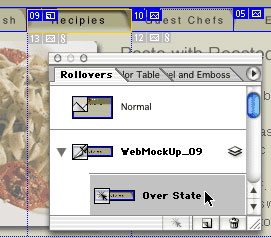
Figure 9: Rollover controls in ImageReady 7 have been reworked to make them easier and more flexible to apply.
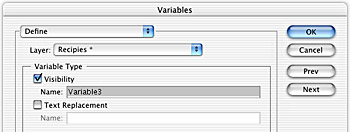
Figure 10: ImageReady includes Variables support for integration with Adobe AlterCast and GoLive integration.
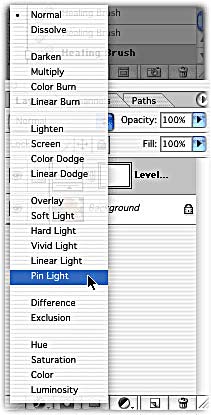
Figure 11: The Blend Modes pull-down menu in the Layers palette has been reorganized to make more sense. It also includes a couple new modes.
What Else Could Anyone Want?
Since Photoshop got so much right early on, it’s debatable as to what new or missing features could be introduced in such a mature, comprehensive application. Even though I sometimes have difficulty thinking what could really make Photoshop all that much better, I did come up with a few, especially when I compare it to other Adobe applications.
Top on my list would be Filter layers. In After Effects and Illustrator, for example, you can use the Effects and Appearance palette together (see “The Creative Toolbox: Keeping Up with Appearances” for more on this). This would allow you to apply a gaussian blur to a layer in a non-destructive manner and go back later and change its options. Anyone who remembers the vaporware QuarkXPosure and its concept of effect gels, knows what I’m getting at. If an incredible feature like this had found its way into this release, I would’ve had no problem with the whole-number version bump.
Nestable layer sets would be nice addition, too. Illustrator has these, why doesn’t Photoshop? And why the need for ImageReady? Not only does the companion application differ in user-interface features and functionality from Photoshop, it tends to run dog-slow when you throw anything more than a moderately layered document at it. I recommend Adobe drop it and pass the burden and any missing functionality over to LiveMotion where it belongs. LiveMotion is much better suited than ImageReady for Web animations and interactions. Lastly, it’s a bit surprising that a Plug-in manager hasn’t found its way into an application that gave rise to notion of the plug-ins. Adobe’s own InDesign now includes a more-than-adequate plug-in manager.
InConclusion
So does this latest version of Photoshop offer enough features for the buck? This time around, it really depends. If you’re running OS X or have been waiting to run OS X until a compatible version of Photoshop came round, then the answer is definitely yes. Windows users, even those running XP, and Mac OS 9 users certainly have more to think about. If the features highlighted in this review are decidedly worthwhile to you then upgrading is something to seriously consider. If after reading about these features you feel you could take them or leave them, then you might want to hold off upgrading until the next time around.
Adobe has done a great job bringing all its major applications over to Mac OS X. I and many others thank Adobe for that. My biggest and only real complaint with this release is that Adobe is passing this .5 upgrade as a full 1.0 upgrade. The modest amount of underwhelming features doesn’t live up to the expectations this version number presents.
Read more by George Penston.
This article was last modified on January 3, 2023
This article was first published on May 7, 2002
Commenting is easier and faster when you're logged in!

Recommended for you

dot-font: Fun with the Push Pin Legacy
dot-font was a collection of short articles written by editor and typographer Jo...
Turning Grayscale to Color in Photoshop
When it comes to creating multitone images, it’s common to think of using the Du...

How to Extract Images with Hair Using Photoshop’s Refine Mask
The following is an excerpt from Speaking Photoshop CS6 by Dave Bate. You can al...