



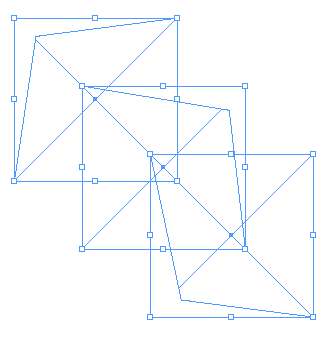
Live Fireworks
The other two products found in the suite are Fireworks MX 2004 and FreeHand MX. FreeHand being the most recently updated MX product to find its way into the suite, received nothing more than a minor update and no new features. For further details on FreeHand MX, you can read my previous review.
However, Fireworks MX does get the 2004 treatment and is afforded a fair number of new features and improvements. The vector-side of Fireworks now has Auto Shapes, making it easy to edit the look of a common shape, such as a star or arrow, while the bitmap-side includes red-eye removal, color-replacement tools, and non-destructive live effects (see Figure 8), so you can edit filters and settings at any time. Macromedia Fireworks MX also boasts an 85 percent gain in performance on some operations.
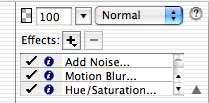 Figure 8: Live Effects in Fireworks MX 2004 gives you non-destructive effects that you can apply and then tweak later on.
The new features found in Fireworks MX gives its big brother, FreeHand MX, a run for its money. The Auto Shapes feature makes customizing a shape less of a chore by providing strategic handles for you to drag and get immediate feedback. For instance, add an Auto Shape arrow and you have several handles that control the arrowhead’s shape, size, and the tail’s thickness and angle (see Figure 9). Auto Shapes can be found in the Vector area of the toolbar and tucked away in the Shapes tab of the Assets panel that create tabs, perspective grids, cubes, and cylinders.
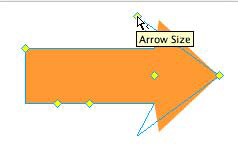 Figure 9: Auto Shapes, found in Fireworks MX, are a novel approach to alleviate the tedium of trying to customize basic shapes.
Selective JPEG compression is now available for any layer mask, text, and buttons. Making bitmap text as legible as possible for the Web has always been a challenge, as I’ve discussed in an earlier column. Fireworks MX makes it much easier by allowing you to take advantage of the anti-aliasing technology native to your operating system (Quartz for Mac and ClearType for Windows) or select from an abundance of custom anti-aliasing settings (see Figure 10).
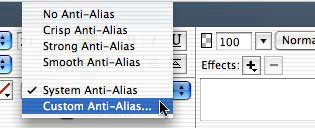 Figure 10: You can now rely on your modern operating system’s anti-aliasing technology or choose from a myriad of custom levels.
All these additions go a long way to making Fireworks MX 2004 come off as a mature and a solid offering. It’s probably the best part of the suite even though it doesn’t get the recognition it sometimes should. If you aren’t using the Photoshop/ImageReady combination to produce and optimize your Web graphics, then you should certainly factor the improvements found in Fireworks MX, in your upgrade decision. Fireworks MX will serve you well with all your Web graphic needs.
This article was last modified on January 18, 2023
This article was first published on October 28, 2003
Commenting is easier and faster when you're logged in!

Recommended for you

Getting a History Palette in InDesign
Wish you had Photoshop's History panel inside InDeisgn? Now you can have one!

Adobe Stock Photos Adds Four New Collections As Service Grows to More Than 450,000 Royalty-Free Images
Adobe Systems Incorporated (Nasdaq:ADBE) today announced four new royalty-free i...
Before&After Design Tip: Design a CD-Size Card Deck that Opens Into Its Own Display
Learn how to design a deck of loose cards to fit in a clear CD case that flips o...