




Keeping with the Times
Features that keep a product innovative if not competitive are all well and good, but these days a two-year-old piece of software can feel as out of date as your operating system. Thankfully, Adobe has graced LiveMotion 2.0 with all the current crop of updates for your operating system and for other Adobe products. First and foremost the application now supports Mac OS X and is Windows XP-certified, much like every other product Adobe has been releasing lately. Not only is this good news for users of these latest operating systems, but also if you’ve plunked the money down for the latest upgrades to Illustrator 10, GoLive 6, or even After Effects 5.5, you’ll be happy to know that all these products work incredibly well together.
LiveMotion 2.0 supports native import of Illustrator 10 documents, surprisingly even ones with transparency, symbols, and envelope distortions applied (see figure 8). What’s more, layered Illustrator and Photoshop documents can still be directly imported as a single layer in LiveMotion and then broken apart into existing layers, groups, or objects. Variables for such aspects as text, styles, and colors, can be assigned in LiveMotion and then dropped into GoLive 6 as a Smart Object. From GoLive you can quickly adjust any variable in the document. GoLive 6 owners using Adobe’s Web Workgroup Server (included with GoLive) can check in and out LiveMotion 2.0 documents. Photoshop import now works even better with layer sets and type. LiveMotion 2.0 employs the Photoshop type-engine, which permits type creation and editing directly in the composition window (see figure 9).
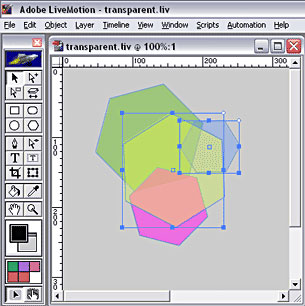
Figure 8: Artwork comes into LiveMotion seamlessly from Illustrator and Photoshop, with transparency intact.
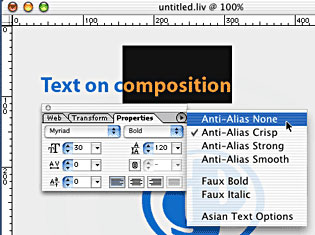
Figure 9: Typing directly within the composition window is now possible thanks to the borrowed Photoshop type-engine. Notice how aliasing can now be defined as well.
LiveMotion 2.0 exports Flash 5 SWFs and animated GIFs and can also write out QuickTime 5 movies, however, interactive aspects of your LiveMotion document will be omitted. Worse, LiveMotion cannot import QuickTime movies, something Flash 5 had no problem with and Flash MX improves upon. LiveMotion 2.0 does integrate nicely with After Effects 5.5 by reading and writing AMX (Adobe Motion Exchange) files. Simple compositions in After Effects can be exported into LiveMotion to add interaction and, conversely, LiveMotion documents can be imported into After Effects to add powerful effects found in the high-end motion graphics product.
Minor Annoyances
It’s evident that Adobe’s main goal with LiveMotion 2.0 was to bring its scripting support up to speed with Flash. It’s hard to find fault with their reasons for doing this but perhaps not everyone was clamoring for full-on scripting support. Although the timeline, scripting, and Adobe product integration have received their share of much-needed updating, many of the rough spots found in LiveMotion 1.0 are still lingering from the original release.
Bearing in mind many Adobe faithful will be drawn to LiveMotion because of its familiar interface, it’s odd to find tools or transformation methods working completely different than its siblings’ counterparts. For example, to quickly rotate an object, you select the top-right handle, whereas every other Adobe application allows you to rotate an object from any corner handle. And while all other Adobe applications scale an object from the handle you drag from, LiveMotion scales from the center regardless of which handle you click on. The only way to get scaling behavior similar to other apps is to move the anchor point to the opposite corner you wish to scale from — tedious and irritating to say the least. It’s also somewhat frustrating not to find a consistent Colors palette across the products or blending modes in the Opacity controls. These are minor annoyances, which show up more as you jump back and forth between LiveMotion and other Adobe products. Don’t get me wrong, Adobe does shared user interfaces better than other companies, but because of this, you’re quick to notice and register annoyance when an Adobe product doesn’t completely follow the rules.
In Conclusion
With this release Adobe manages to push past the weaknesses that crippled the initial offering. LiveMotion 2.0 is an innovative, intuitive tool that demonstrates how a proven, elegant user-interface (despite some minor annoyances) can go a long way to set the bar of what a Flash-animation tool can and should be. Existing LiveMotion users or fans of other Adobe products needn’t think twice about buying this upgrade.
Newcomers to the web animation/interaction scene will be better served trying out LiveMotion 2.0 instead of trying to contend with Flash’s quirkiness and steep learning curve. And those of you using Flash because you felt you had to, may just find LiveMotion a delight to use. Flash users can forget about creating and managing symbols or trying to remember multiple steps to build a simple motion ‘tween. If you’re tired of dealing with Flash’s oddities, and if Flash MX doesn’t seem to offer you anything compelling to stick with it, give LiveMotion 2.0 a try. Adobe is currently offering a special introductory price of $199, about half the price of Flash MX.
Once you begin using it you may find yourself trying to come up with projects to use it on. Much like Photoshop and Illustrator, LiveMotion seems to offer boundless possibilities just waiting for you to unlock. Because of this, it’s slightly addictive and a fun tool to create and experiment with.
Read more by George Penston.
This article was last modified on January 18, 2023
This article was first published on May 14, 2002
Commenting is easier and faster when you're logged in!

Recommended for you

Shag, A Retro Font Family with Roots
The Shag family of fonts is a fun, nostalgic collection inspired by the work of...

dot-font: Dot-Dot-Dot Dis
dot-font was a collection of short articles written by editor and typographer Jo...

Tip of the Week: Adding Keyboard Shortcuts for Alignment Commands
This InDesign tip on adding keyboard shortcuts for alignment commands was s...