




More Than Just Vector Animations
Flash may have begun as a vector animation tool but that was then and this is now. The MX version touts far better video and high-fidelity audio support. Import and manipulate any standard video format. Using the new Free Transform tool, you can distort a bit of video and then export it out as streaming SWF. This is light years from the paltry support found in previous versions and forces the issue of LiveMotion 2’s lack of movie importing. And now it’s possible to draw an object or mask without ever touching the pencil or shape tools. Flash MX allows you to create graphics and masks on-the-fly using ActionScript.
Speaking of LiveMotion 2, it would have been great to see bitmap filters show up in this version of Flash. This is something that LiveMotion offers by rendering out a bunch of bitmaps but which often results in much larger file sizes. If Macromedia included a small set of filters with its Flash player/plug-in, the filters could be rendered at the browser side, much like SVG. This would keep downloads small but make bitmap filter effects such as blurring possible. Flash’s bitmap handling has been given a couple of new features. Rather then importing a JPEG into a Flash file you can link to it and dynamically load it at runtime, meaning you can swap out the JPEG at anytime for another without ever going into the Flash file. Same thing goes for MP3 files.
Anyone who’s had the joyless experience of creating a scroll bar, radio button set or any other form control in Flash before, will love the addition of UI components in MX. These little wonders make it possible to simple drag a scroll bar on top of a text box and have it add scrolling behavior to your average text box; all without a bit of coding on your part. Checkboxes, pull down menus, radio buttons, include their inherent behaviors you know and love (see figures 7 and 8). Flash MX comes with a nice complement of UI components ready to use with many more available for download from Flash MX Exchange. Flash UI components show just how serious Macromedia’s is about Flash becoming a true application development package.
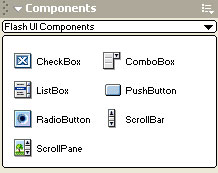
Figure 7: You can drag and drop user interface components into your Flash applications.
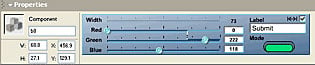
Figure 8: Components can also include real-time parameters that can be adjusted. Changes show up immediately in the work area.
Approaching Perfection
After learning Flash some time ago and watching it mature through the years, I’ve come to the conclusion that Macromedia has really outdone themselves with this version. Flash is still a beast of an application to learn but Macromedia has gone to great efforts to help ease the pain along your way. The reference panel is a lifesaver along with the Normal mode of the Actions panel. Although LiveMotion still might win out on ease-of-use and accessibility in learning its product, it’s dead obvious that Flash is the graduated package of the two (see figures 9, 10, and 11).

Figure 9: Symbols can now be edited in place, saving you from losing the context of an instance’s placement.
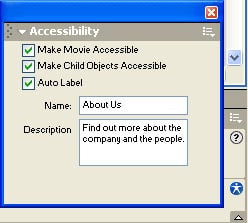
Figure 10: Flash MX now includes a good deal of accessibility options.
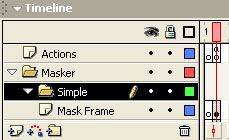
Figure 11: Fully nestable layer folders have been added to the Timeline controls to help in organizing complicated animations.
Professionals doing extremely extensive ActionScript or looking to do video work in Flash SWFs should set their sights on Flash MX. I still would encourage people wanting to learn Flash for lightweight work to first try out LiveMotion 2 then Flash. The reason I recommend LiveMotion for newbies is the regrettable fact the Flash is still a bit confusing when attempting to tween objects and managing symbols, something LiveMotion 2 excels in making intuitive. Fixing up these two areas along with adding bitmap filters are enhancements I’d like to see in a future version of Flash. But in no way should this deter the Flash users out there that know and use this application day-in, day-out. MX is easily a no-brainer upgrade for anyone continuing work from previous versions.
Many other features and enhancements have found their way into this version, far too many to detail in this review. This is just a testament of how significant this upgrade is. Sure, the $199 upgrade is a bit on the pricey-side, but it is unquestionably worth it. Although Flash has had a hard time casting off the stigma of being a difficult-to-learn application to make visually barraging animations with, it’s time to stand up and start taking Flash seriously if you haven’t already. It has definitely come a long way.
This article was last modified on January 8, 2023
This article was first published on June 11, 2002
Commenting is easier and faster when you're logged in!

Recommended for you

10 Ways to Unflubbify Your Writing
This new book is filled with simple clarifications and fun, easy ways to remembe...

Enhanced New Nitro PDF Professional 5.3 Ready for Free Download
Nitro PDF Software, the company that revolutionized the PDF software market with...

Add More Images to your Multiplace Queue
Have you ever wanted to place multiple files from more than one folder at a time...