



Whether it’s your job to create documentation for a project, or you’re just trying to understand the formatting of a document that was built by someone else, a free script by Dave Saunders can be a big help. The script creates a list of all the paragraph styles in the document where each style name appears in the formatting of the style. It gives you the ability to make an instant visual guide to a document’s paragraph styles.
The list is put in a text frame on the pasteboard, and the order of the styles matches what you see in the Paragraph Styles panel.
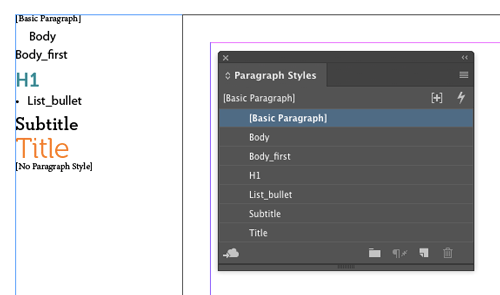
Pretty handy!
Click here to download the script.
This article was last modified on July 28, 2022
This article was first published on May 16, 2017
Commenting is easier and faster when you're logged in!

Recommended for you

InDesign Magazine Issue 100: 100 Tips, 100 Free Scripts
We’re happy to announce that InDesign Magazine Issue 100 (August 2017) is now av...
Tracking Down a Mysterious Linked Text File
A great bit of troubleshooting reveals the source of a missing text file in the...

Tip of the Week: Fast Text Formatting With the Eyedropper Tool
With the Eyedropper tool you can quickly sample and apply all kinds of formattin...