




Excerpted from Deke’s Techniques on lynda.com.
Starbursts are very popular in layouts and illustrations of all sorts, and that’s a problem. You don’t want to look like everything else! But that doesn’t mean you need to give up starbursts — customize them instead.
In this tutorial video, I’ll show you two ways to make unique starburst shapes. The first relies on “path wigglers” in the Effect menu, including Roughen Up, Distort & Transform, and Pucker & Bloat:

You can modify these path outline effects in the Appearance panel after applying them.
I then use something new to CS5, the Crystallize tool inside the Width tool, to create this stellar standout:
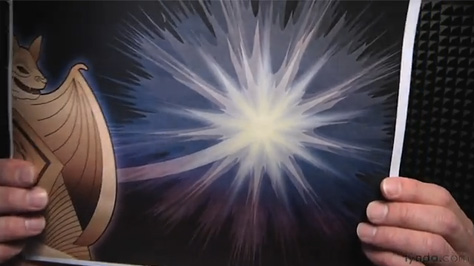
Click below to watch the video:
Visit Deke’s Techniques for more Photoshop and Illustrator creative how-to projects in about 10 minutes.
This article was last modified on October 5, 2011
This article was first published on October 5, 2011
Commenting is easier and faster when you're logged in!

Recommended for you
Stop InDesign from Shuffling Pages
Stop InDesign from shuffling your pages with Laurie Ruhlin.

Review: Crazy Talk 8
CrazyTalk 8 by Reallusion is an application that brings photographs to life, ena...

CreativePro Week 2021 Agenda Announced
Five days, 100+ incredible sessions to take your skills to the next level We’re...