


SmartSaver Pro 3.0: Big Web-Graphics Help for a Small Price

Windows users looking for a one-stop Web-graphics utility should turn their discerning eyes to Ulead SmartSaver Pro 3.0. Though beginning life as a simple optimization utility that could shrink the size of GIF and JPEG images, SmartSaver has evolved to provide nearly every function a person could need to prep graphics for the Web, offering advanced tools to output GIF, JPEG, or PNG images; HTML tables; JavaScript code; and image maps. At a list price of only $59.95 (upgrade $34.95), the software is an amazing bargain that will appeal to both professional and amateur Web developers. One drawback for some users: The utility is not available for the Mac, although other alternatives exist such as Adobe ImageReady.
SmartSaver can be operated as a stand-alone application, but it also runs within any image editing program that supports the Adobe Photoshop Effects or Export Plug-in specifications. The program sports all of the latest interface conventions, including MS Office-style toolbars, dockable palettes, and a tabbed workspace. Clicking a tab allows you to switch between different activities. The Slicer tab, for example, allows you to create and modify an HTML table. The JavaScript, Image Map, and Optimizer tabs let you add interactivity, assign URLs, and compress images. If you have Internet Explorer 4.x (or later) installed, you can also preview your Web graphics directly within SmartSaver Pro by clicking the Preview tab.
Slice and Dice
The current release of SmartSaver Pro offers very powerful image-slicing and table-management functions, which let you divide a larger graphic into smaller sections that are then reassembled in the reader’s browser using an HTML table. This approach lets you optimize each slice of a graph separately, or even swap out slices for JavaScript rollovers or animated GIF images. You can begin a project with a blank table and import new images into individual table cells. This feature gives SmartSaver Pro rudimentary composition capabilities. In addition, the cell properties palette now allows you to view and change attributes — such as background color, cell color, and cell contents — for each segment in an HTML table.
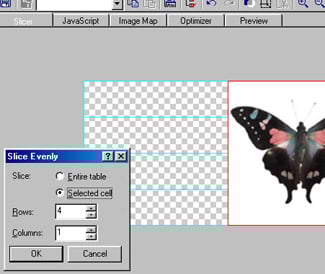
Ulead Systems also improved the slicing tools themselves. You can now see the coordinate position of your cursor as you draw a slice, and you can divide individual cells (as well as the whole image) into equal segments. Don’t overlook this seemingly small feature, which lets you create evenly spaced menu items with the click of a button. Once you’ve created a complex table layout, you can save the slice information as a preset, which you can then reuse with other images.
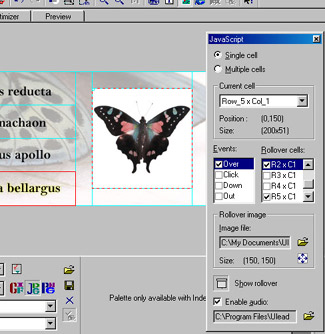
We were especially impressed with SmartSaver Pro’s new JavaScript functions. In addition to simple rollovers, you can now create one-to-many, distance, and audio rollover effects. For example, a mouse-over action on one cell can trigger multiple events, including replacing the current cell with a GIF animation, replacing a non-contiguous cell with a new image, and playing an audio file.
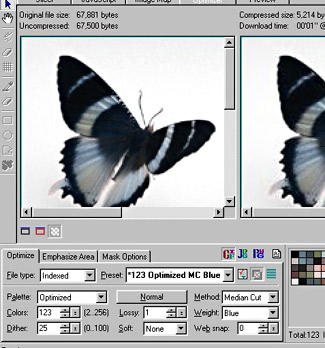
The previous version of SmartSaver Pro offered advanced image compression functions, such as side-by-side views of the original and optimized images, a choice of different sub-sampling routines for JPEG output, and transparent background based on either color selections or alpha-channel data. These basic compression functions have not changed. But Version 3.0 adds a number of fine-tuning controls. For example, when saving GIF images (or 8-bit PNGs) you can now tweak the palette by adding, deleting, and locking the values in individual color slots. You can even choose to snap an individual palette color to the closest Web-safe hue. SmartSaver Pro also supports lossy GIF, which delivers higher compression ratios by forcing adjacent pixels to the same color. If you are saving JPEG images instead, you can take advantage of separate compression controls for quality and chroma. When used properly, these tools help you to generate faster-downloading pictures without compromising quality.
In and Out
For non-HTML programmers, cutting and pasting complex Web graphics (and the associated JavaScript code) into a larger HTML document can be confusing. SmartSaver Pro attempts to make the process easier with a new automated command that can add graphics to an existing HTML file for you. In theory, SmartSaver should automatically place the JavaScript information in the header area, and position the table data at the bottom of the page. In our tests, however, we often had to manually cut and paste the JavaScript code into the proper position. On the plus side, the program writes clearly structured HTML code that is easy to edit.
SmartSaver Pro 3.0 adds another HTML feature that works much more consistently, and that we found to be much more valuable — the ability to export absolute positioning information. Web developers who routinely position elements using coordinates will be able to use this feature to precisely place graphics into an existing HTML file. In fact, the program is chock full of small features that can dramatically increase your productivity. For example, when you import a Photoshop PSD file you can merge all layer information into a single static image, or preserve the layers as a multi-frame animation. And you can now batch compress files that are referenced in an HTML document, allowing you to easily optimize an existing Web site regardless of whether it is stored locally or on the Web.
Now or Never
SmartSaver Pro falls short of perfection. For example, when you are optimizing images on a Web server, SmartSaver Pro still requires you to save the optimized images to your local drive, because it lacks integrated FTP functions. A more serious shortcoming: The program cannot save the current project — which might comprise multiple images, slice data, optimization settings, and JavaScript rollovers — in a single intermediate format. As a result, you can’t work on a project across multiple sessions. You’ll have to finish your composition in one session or save lots of presets, which you would then have to import one by one into a new file when you want to start work again. SmartSaver Pro could employ a simple workaround by importing HTML tables, but it doesn’t do that, either. This single weakness gives competitors such as Macromedia Fireworks and Adobe ImageStyler a major advantage, because they can save editable compositions in the PNG and PSD formats respectively.
Despite this criticism, we highly recommend Ulead SmartSaver Pro 3.0. As a plug-in, SmartSaver Pro offers convenience, because you can use it in conjunction with your favorite image editing program. With its price of only $59.95 — a fraction of what you’d pay for a full-featured Web-graphics editor, such as Macromedia Fireworks ($200 street price) — and with more features than comparably priced programs, such as NetStudio 2000 ($77 street price), SmartSaver Pro is a great value. And with a full range of table, JavaScript, and optimization functions, the program may be the only Web-graphics utility you ever need. For those who like to try before they buy, Ulead even offers a fully functional 15-day trial version for free download.
This article was last modified on January 18, 2023
This article was first published on July 12, 2000
Commenting is easier and faster when you're logged in!

Recommended for you

New MadeToPrint XT for QuarkXPress Offers High Automation Level
The new version 1.5 of callas MadeToPrint XT, which is being presented at Print...

Find More Than One Paragraph with GREP
GREP is, by default, set up to find text inside a paragraph. That is, if you sea...
How to Share a Custom Dictionary
Dave wrote us the following: I was wondering if its possible to have the whole c...