




This is a tip I’ve been meaning to write-up for sometime? it ended up on the backburner with a lot of other tips and outstanding projects in the past couple of months?
Back in InDesign CS3 Text Variables were introduced. Amongst a number of other things we can use them to automatically generate running headers at the top of book or report pages, by placing a text variable placeholder on the master page that automatically inserts text formatted with a pre-allocated paragraph style.

In short: To define a new Running Header text variable: Type menu > Text Variables > Define… Select Running Header, then New… Once you’ve defined the style, Insert the variable in the placeholder area on the master page.
Generally running headers copy text formatted with a particular paragraph style into the running header text variable. However there are some situations where the link to a paragraph style might not work. For instance:
- what if you only want part of a header to be copied into the text variable placeholder OR
- what if you are using multiple paragraph heading styles (say heading 1, heading 2, heading 3) and you always want the first or last one used to populate the variable placeholder you’ve so nicely inserted on the master page?
This is when the hidden character style trick comes into play.
All you’ve got to do is create a character style that does absolutely nothing ;-) Yup, you heard it right? it does nothing? doesn’t apply any settings? it just exists.
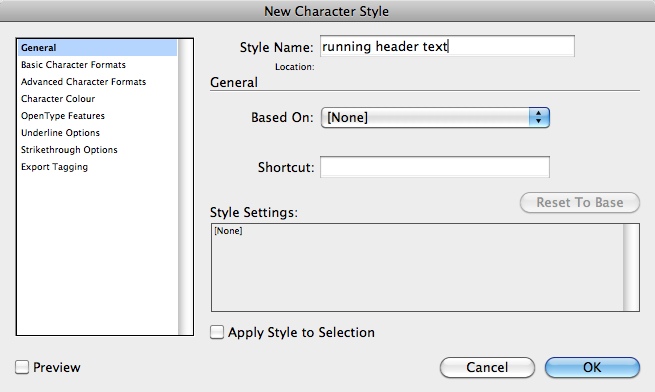
For the running header, change the Running Header (Paragraph Style) to Character Style and set the Style to the character style you created in the previous step.
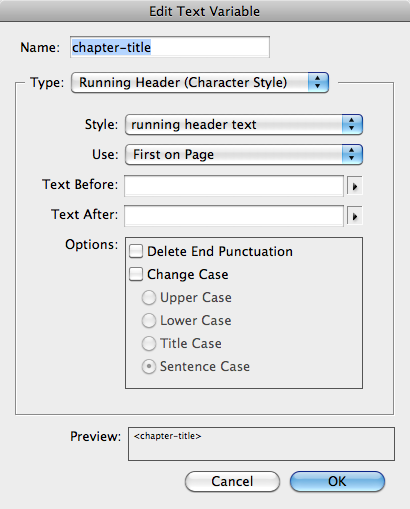
Once that’s done, all you’ve gotta do is highlight the text you’d like to see in the running header and you’re cooking with gas ;)
Ooooh and what if you don’t want to manually apply the character style (as in case 2 above)? Apply the character style that does nothing to any of the heading styles (e.g. through using a nested style and you’ll never need to worry :)

This article was last modified on December 21, 2021
This article was first published on October 3, 2011
Commenting is easier and faster when you're logged in!

Recommended for you

Words Hyphenating Wrong in InDesign
P.G. wrote: I am proofing an InDesign document, and it has some awful hyphenatio...

This Week in InDesign Articles, Number 127
What a busy few weeks! Lots of learning and talking at conferences (including ou...