



Bookraft Solutions has created a really useful script that will be of interest to anyone who works with documents containing styles. Search in Styles ($49 USD) will let you perform a Find/Change operations to edit your document’s paragraph and character styles. Why is this useful? Here are a couple examples:
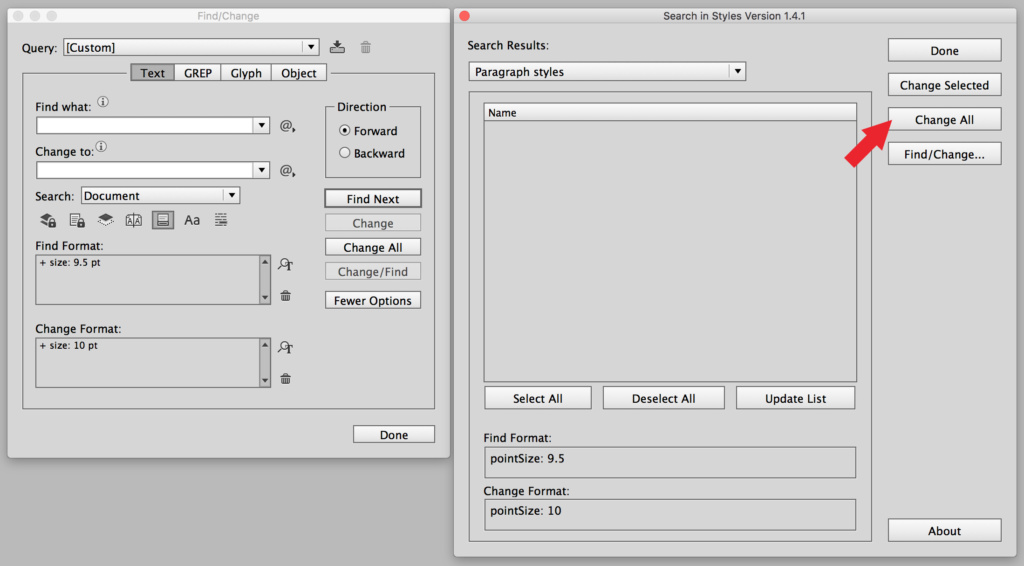
When you first run the script, all of your paragraph styles are displayed in a long list. Clicking on the Find/Change button displays InDesign’s Find/Change dialog box, shown here on the left.

Now, imagine that I want to find all of the Paragraph Styles that specify 9.5 pt type. First, I specify that in the Find Format field in the Find/Change dialog box on the left. Then I specify 10 pt type in the Change Format field, so the dialog boxes look like this:

Next, I click on the Update List button to load the settings from the Find/Change dialog into the Search in Styles dialog and display only the Paragraph Styles that specify 9.5 pt type:

Then, I click the Change All button to change the styles in the list to 10 pt. In the screen shot below, the button has already been clicked, so the “QA question text” and “QA answer text” styles have disappeared from the list, because they no longer specify 9.5 pt…they’ve been changed to 10 pt:
Here’s another thing you can do with the script. Imagine you want to find all the Paragraph Styles with “Title” or “title” in the name, and change the font in those styles to Adelle Sans Bold. In the screenshot below, I’ve entered Title|title in the Find what field. The “|” character means “or” in GREP code. The script supports simple GREP expressions in the find and change fields.
In the Change Format field, I’ve specified Adelle Sans Bold. After clicking on the Update List button, I see all the Paragraph Styles with “title” in the name displayed in the list. Clicking on the Change All button would change all of these styles to specify Adelle Sans Bold.

This script could save hours of work and frustration. It would be particularly useful for cleaning up documents that have been authored and edited over a long period of time by several people. These documents tend to be full of old, redundant, or mislabeled styles. Cleaning these up would be much easier with the help of this script.
This article was last modified on July 20, 2021
This article was first published on March 1, 2017
Commenting is easier and faster when you're logged in!

Recommended for you

Free Scripts to Convert Color Images to Grayscale
While creating a series of presentation templates for a client, I hammered toget...

A Solution for Packaging Files With Missing Plug-ins
Recently, I worked on a project where I had to package over 100 I...
A Data Merge Script for Outputting to Individual Files
If you need instruction on using InDesign’s Data Merge features, Colin Fla...