



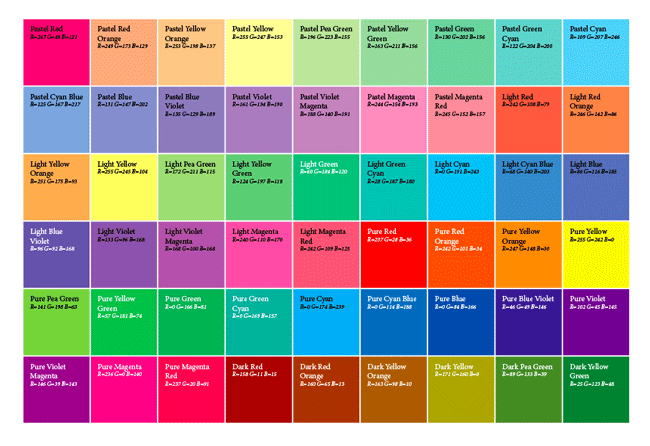
The folks at Rorohiko never cease to amaze me with the cool and useful add-ons they create for InDesign. One relatively new such item is SwatchWatch, a free script you can use with InDesign CS5 and later to create a grid of color swatches in your documents.

Interestingly, SwatchWatch also serves as a “Case Study” in custom script development. The download page for the script details the steps in the process of working with Rorohiko to create a customized solution to fit a need in your workflow. Issues like establishing a budget, understanding requirements, working with a prototype, sign off, and purchasing source code are discussed.
The script itself is a nifty piece of work. When you run it, a grid of labeled frames showing the swatches in the current document (along with their names and color values) is created. The grid is placed on newly created pages at the end of the document. If you make changes to your swatches you can simply re-run the script to update the grid.
The swatch grid is very customizable. By editing a companion text file, you can set options like the frame size and gutter width, plus object and paragraph styles to format the grid, and more. And you can even tell the script which swatches to ignore if you don’t want them to be part of the grid. The default ignored swatches are None, Paper, Registration, and Black.
So check out Rorohiko’s SwatchWatch, learn about the process of custom script development, and add the ability to instantly create and update grids of the swatches in your documents.
This article was last modified on December 30, 2021
This article was first published on June 19, 2014
Commenting is easier and faster when you're logged in!

Recommended for you

InReview: Table Tools for InDesign
A useful set of scripts for anyone who regularly works with complex tables.

Make a Knockout Black that Does Not Overprint
Sometimes you want to use a black that knocks out color beneath it instead of ov...

Keyboard Shortcuts For Proxy Reference Points in InDesign
Ever wish you could use keyboard shortcuts to change the reference point used to...