




Reproduced with permission of Planet Quark
Adjustments applied in QuarkXPress’s Picture Effects palette (Window> Show Picture Effects) exist as part of the QuarkXPress project file — they do not change the original source pictures.

If you want to update the original picture files themselves with the effects, choose File > Save Picture and select either Selected Picture or All Pictures in Layout.
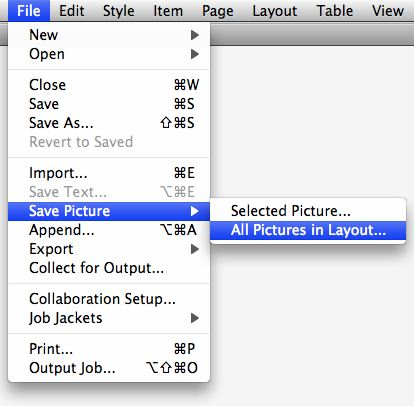
This is incredibly handy for providing your cropped, rotated, or altered pictures to a Web developer. It’s also handy for simply converting a picture from one file format or color space to another:
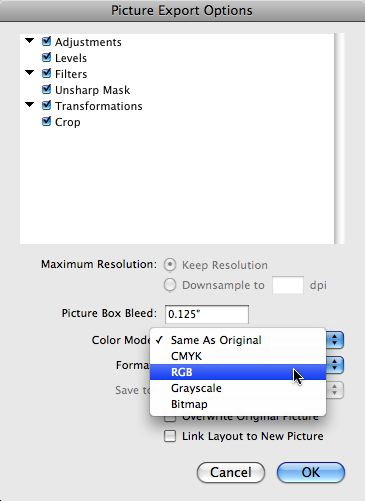
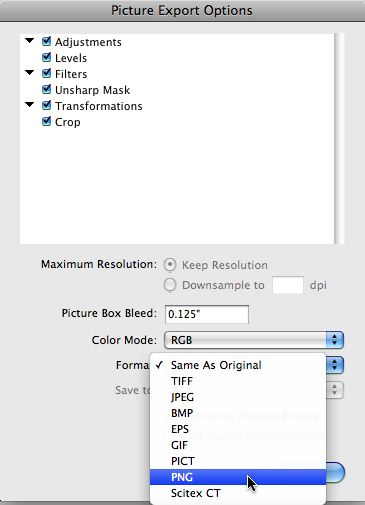
When you export the pictures, you may want to enable the Link Layout to New Picture option in the Picture Export Options window, but leave the Overwrite Original Picture option disabled, to preserve your originals.
Also, for ease in future editing, increase the Picture Box Bleed value, since otherwise the image data is cropped to the edges of the picture box.
This article was last modified on December 17, 2022
This article was first published on November 5, 2009
Commenting is easier and faster when you're logged in!

Recommended for you

Lightroom 4 Ships with Lower Price
After two months in public beta, Adobe Photoshop Lightroom 4 is now shipping. Th...
ColoRotate, the mobile color companion to Photoshop
With Adobe’s Kuler on hiatus, it might be a good time to check out alterna...

Image Editing in Lightroom 5: Raw or JPEG?
The following is an excerpt from The Adobe Photoshop Lightroom 5 Book: The Compl...