



Quark recently released the Quark Print Collection, a bundle of XTensions for QuarkXPress 7.01 and plug-ins for Adobe Acrobat Standard and Acrobat Professional. The Collection is based on software Quark purchased when it acquired a lowly apprentice production (ALAP) last year. The Collection brings powerful imposition capabilities to QuarkXPress and Acrobat, and it gives XPress the ability to customize the color bars, register marks, and other markings used by commercial printers on the edges of press sheets.
When I last tested ALAP’s Imposer Pro more than a year ago, it was the best low-cost imposition product on the market. Its features approached those of the very-high-end imposition products, such as Kodak Preps, Farrukh Systems Imposition Publisher, and Impostrip from Ultimate. I define “high-end” as programs that can make impositions of more than four pages on a side; impose signatures of 12- and 24-pages; allow for custom press sheet arrangements; and nest different documents in one imposition. In the past, these sophisticated features came with a high price tag.
The new Quark Imposer XTension is as good as ALAP’s Imposer Pro, and at $299 for the bundle, you’ll spend $100 less you would have for ALAP Imposer Pro alone.
May I Impose on You?
Imposition is the arrangement (or rearrangement) of pages into printer’s spreads and the printing of those pages so that they’re in the correct order when folded, gathered, and trimmed. The more complex definition of imposition includes rotating some pages so that opposing rows of pages are head-to-head. Add to that complexity the ability to break many pages into signatures that cross from one sheet of paper to another for a variety of binding processes.
The first consideration of imposition is, how will the document (which I’ll refer to as a booklet) be bound? Will it be bound magazine style (saddle-stitched binding) or will it take the form of a book, with consecutive signatures glued (perfect-binding) or sewn (hard-back binding) into a cover? (See Figure 1 for visual examples.) Quark Imposer handle each of these classes of binding.

Figure 1. The booklet on the left has signatures prepared for saddle-stitching (magazine-style binding) with non-consecutive page numbering. On the right, the booklet has signatures prepared for perfect binding (paperback book or hard-back-style binding) with consecutive page numbering.
Quark Imposer has settings for five types of imposition: traditional sheetwise (which it calls standard), work-and-turn, work-and-tumble, split-web, and a sheet wise defined differently from traditional sheetwise. The variability of these impositions covers nearly every common (and some uncommon) press arrangements. For an illustrated introduction to sheetwise and work-and-turn imposition, read “Between the Sheets.”
Bleeds, Trims, and Cross-overs
One of the most difficult things for an imposition program to accomplish is to manage items that cross pages or cross signatures. Quark Imposer does this without difficulty, producing elements of both sides of a crossover that extend beyond the fold or the trim to the degree set in the software. I tested this in QuarkXPress and Acrobat Pro with success in both.
That’s Creepy
As you add signatures to a job, the thickness in the spine of the signature pushes the artwork on successive pages away from the spine. Good imposition programs can manage this phenomenon, called “creep,” by adjusting the position of the elements on every page inward or outward to make the pages come out in the same position when the booklet is trimmed.
Quark Imposer manages creep perfectly. To test it, I created a 64-page publication and put a hairline rule in the center of each page running off the top and bottom of the page.
Quark Imposer expects a value entered for creep in points, but it will accept entries in other units of measure. I used a micrometer to measure the thickness of one sheet of my paper — 0.0045 inches — and multiplied by 16 (the number of sheets in my signature). I entered the resulting value — 0.07 inches — in the creep value on Imposer’s palette. The software converted my value into points (Figure 2) and then printed the signature. I trimmed the stapled signature and checked the variance of the thin lines that bled off the top and bottom of each page. It was perfect, with no visible error in page positioning.
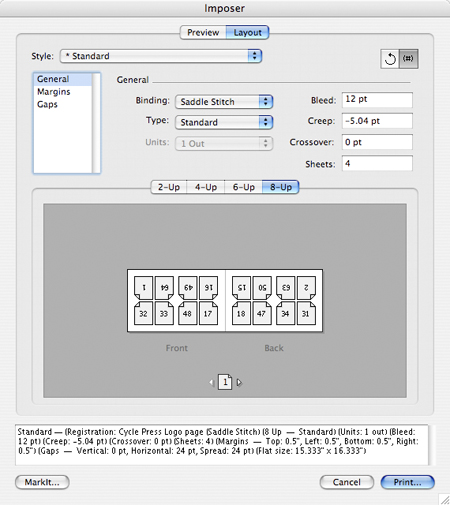
Figure 2. Imposer’s main window provides a correct view of the imposition with all page numbers shown accurately. (You can set Page 1 on any appropriate starting page.) Notice the setting for –5.04 pt. creep adjustment, which causes the image on each succeeding form to move inward by a small amount to compensate for paper thickness in the gutter.
With the death of film imagesetters and the rise of computer-to-plate systems, print shops rely on imposition systems to prepare artwork for printing. No matter how files are created, ultimately the document must be imposed to drive a platesetter. It’s critically important to be able to position pages, include marks and color bars, and move the entire imposition around on the plate to accommodate different binding requirements.
To test for these capabilities, I created a 64-page booklet and moved the margins to simulate the process of creating a lip on one side of each signature to accommodate the feeders on a Müller-Martini automated saddle-stitching machine. Quark Imposer had no problems.

Figure 3. Examples of the various paginations supported by Imposer. These include common four-page work for small printers, and four, eight, 12- and 16-page impositions for the presses found in commercial plants around the world.
MarkIt Gets High Marks
The Quark Print Collection includes an XTension for QuarkXpress called MarkIt, which defines special marks, color bars, register marks, company logos, and more. I tested it by designing a small logo for a fictitious printing company, saving it as an EPS illustration, and then importing it into MarkIt (Figure 4).
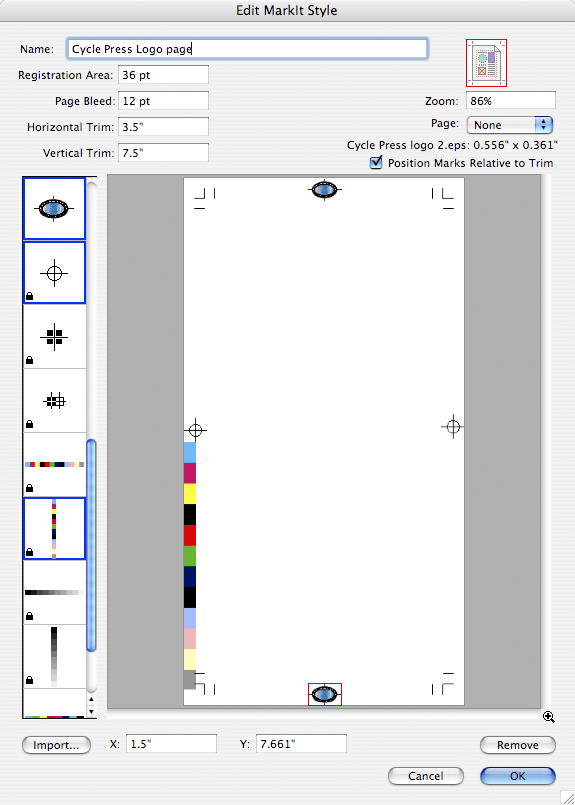
Figure 4. The MarkIt XTension offers stock color bars, register marks, and grayscale ramps. I imported an EPS illustration to customize my layout with a printer’s logo (elliptical mark top and bottom). You can access the MarkIt tools work in QuarkXPress, but not in Acrobat. To see a larger version of this image, click on it.
MarkIt, which is very precise, has many uses. For example, you can import industry-standard color bar sets and custom marks for any purpose. You could also watermark an imposed proof to prevent its misuse.
One Weakness
Quark Imposer is first-class software with nearly every feature of its much more expensive rivals. It makes impositions for the most common press sheets, in signatures up to 16 pages. The only pagination I tried that Imposer can’t produce was a 12-page saddle-stitched sheet. Though Imposer can do a 12-page imposition, it can rotate pages in 180 degree increments only. To make a saddle-stitched 12-page, pages must be rotated in 90-degree increments. This 12-page is not uncommon, as it is used to create square-page documents on typical rectangular press sheets.
Should You Care?
Quark Imposer is sophisticated enough to be used for prepress operations in plants with 29- and 40-inch presses and computer-to-plate systems. But it’s also useful to an individual creative pro who imposes documents for any purpose, makes imposition mock-ups, or produces digital output of four-page documents on two-page printing machines.
This article was last modified on January 18, 2023
This article was first published on November 27, 2006
Commenting is easier and faster when you're logged in!

Recommended for you

Apago Ships PDF Appraiser, Industry-First Tool for Creating and Validating PDF/A Documents
Apago Inc., a software developer for the graphic arts and document management in...

New Script & Ornament Fonts
The new faces are P22 Slogan and P22 Nebiornaments. P22 Slogan is a non-connecti...
Axaio Software Releases MadeToPrint for Adobe InDesign CS3
The MadeToPrint Plug-In for Adobe InDesign CS3 is out: MadeToPrint vendor axaio...