


Reply To: Highlighting text with Grep Styles?


This article was last modified on June 19, 2010
This article was first published on
Commenting is easier and faster when you're logged in!
Loading comments...

Recommended for you

Article
UpperCut Images Signs Photographer Spike Mafford
UpperCut Images, an exclusive rights-protected stock photography agency owned by...

Article
Out of Gamut: The High-Bit Advantage
In my last column on relative gamut sizes in color spaces such as my eponymously...
Article
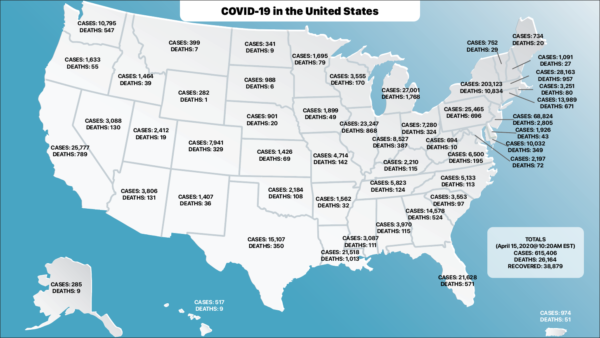
Using InDesign and XML to Visualize the COVID-19 Data
The COVID-19 Pandemic is something that has touched us all in one way or another...