



You know how people love typing extra returns between paragraphs in a story to insert extra space between paragraphs? They obviously don’t know about Space Before or Space After, which is the proper way of handling inter-paragraph spacing. So how can you remove all those returns?
The easiest way is to open the Find/Change dialog box and choose “Multiple Return to Single Return” from the Query pop-up menu. That switches to the GREP tab and types in a bunch of grep code for you. When you click Change All, it removes all the extra spaces — whether there were 2 or 20 returns in a row.
But what if you really did want space between each paragraph? Can you replace the returns with a little “space before/after”? Sure! After choosing from the query pop-up menu, click in the Change Format area at the bottom of the find/change dialog box. (If you don’t see that, click More Options.) Then assign some Space After in the Change Formats dialog box. Or, far better: Apply a paragraph style that uses Space After.
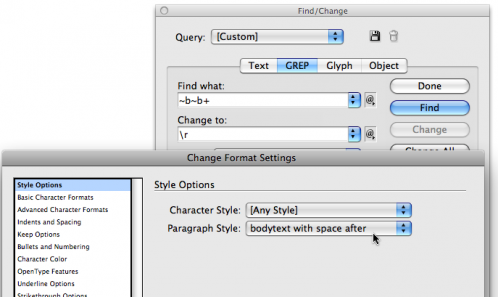
Now when you click OK and then click Change All, the returns will be replaced with a single return… and the paragraph before those returns will change to the new formatting (with space after).
Now, personally, I prefer using Space Before, but I know others who like Space After (like my co-author Ole Kvern). It’s just a different way of thinking. Anyone want to take a crack at the grep code required to modify this to use space before instead?
This article was last modified on December 20, 2021
This article was first published on December 4, 2009
Commenting is easier and faster when you're logged in!

Recommended for you

InQuestion: Space Before and After, Image Captions, Cascading Master Pages
Erica Gamet highlights the best Q&A from the incredible InDesignSecrets Facebook...

10 Find/Change Tips
Want to learn more about Find/Change? Check out these 10 Find/Change tips!
Convert Text to Lowercase with a GREP Utility
InDesign's GREP cannot convert text to lowercase... but that doesn't mean you ca...