


Reinventing Quark: Teaching an Old Dog New Tricks


QPS: A Guided Tour of the Next Generation
Quark has been selling publishing systems for years. The Quark Publishing System (QPS), launched in 1992, the Quark Digital Media System (QuarkDMS), first sold in 2000, and the Quark Dynamic Document Server (QuarkDDS), launched last year, comprised the start of a multi-channel publishing system, but customers found it confusing. Even grouping all these systems under the QuarkDMS umbrella didn’t end the confusion, since corporate customers didn’t want to buy a publishing system — they wanted something that had been specifically tooled for the enterprise (even if what they were doing was substantially the same thing as professional publishers.)
Consequently six months ago Quark set out to realign and package its enterprise offerings to make more sense to customers in both the professional and enterprise-publishing markets. And here — ta da! — is what it has come up with:
In recognition that both professional and corporate publishers need to support multi-channel publishing workflows — but that often the names of the processes, and to a certain measure the processes themselves, are different — Quark has divided its enterprise products into two distinct lines targeted at each market category. The product suite for the Professional Publisher, geared toward professional publishers such as ad agencies, magazines, newspapers, and the like, will be called Quark Publishing System, and come in three editions:
- QPS Classic, which will consist of the QuarkDispatch server with a proprietary database, and supports 5-50 users;
- QPS Plus, which will consist of the Quark Enterprise Server Suite with SQL database, with some limitations, and supports 50-100 users — this edition is still in development;
- QPS Enterprise, which includes Quark Enterprise Server Suite with an Oracle 9i database and includes Quark Digital Media Server and Quark Dynamic Document Server, and supports more than 100 users.
QPS Classic is currently at Rev Level 2.2, but at the next rev level (3.0) it will support QuarkDispatch 3 running on Mac OS X, QuarkXPress 6, and QuarkCopyDesk 3 running on Mac OS 9 & OS X, and Windows 2000 and XP.
QPS Enterprise is currently at Rev Level 1.9, and supports Quark Digital Media Server 1.6.3 on an Oracle platform, QuarkXPress Passport 5.01 and QuarkCopyDesk Special Edition 2.2. The next release , version 3,will offer Quark Digital Media Server version 2.1, running on Oracle 9i and Windows 2000 and Solaris, QuarkXPress 6, and QuarkCopyDesk 3, which runs on Mac OS X and Windows 2000 and XP. QPS Enterprise is designed to be easily expanded via the additional of a series of modules, which will be described later in this article, and is compatible with industry standards and third party software. It enables a publisher to integrate diverse groups into a unified publishing environment — editorial production, ad booking and production, publications planning, Web production, custom publishing, and legacy systems.
The product suite for the corporate market, targeted at industries such as advertising, catalog or retail publishing, financial, pharmaceutical, automotive, and corporate marketing communications that do very different things within widely variant workflows, and serve a user base with a wide range of technical expertise, will be called Quark Content Manager (QCM), and will come in two editions:
- Standard, which includes the Quark Enterprise Server Suite with SQL database, with some limitations — which is still in development;
- Enterprise, which is the same as Standard but with the Oracle 9i database.
Both are roughly equivalent in feature and functionality as their Professional Publishing counterparts, the Plus and Enterprise Editions, respectively.
Confusing, isn’t it? I’ve advised Quark to simplify its product offerings and naming conventions. It doesn’t help that many of the products being revved or launched have appeared in previous incarnations with somewhat different names. The following table is our attempt to map Quark’s old to its new product names (see Figure 1}.
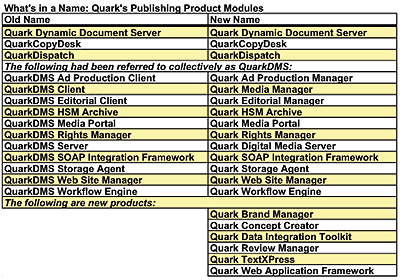
Since both QPS Enterprise and QCM Enterprise share the same core services and the same modularity, I’ll cover them below in relation to QPS Enterprise rather than listing them under each product line — just know that most can be used to enhance either system.
QPS Enterprise unifies editorial workflow and database-driven content management on an enterprise scale for a publishing organization. With the capability to manage a publisher’s specific workflow, the customizable system delivers a solution composed of several modules that are designed to enhance creative and production processes. Different modules can incorporate ad production, the photo desk, and wire services. Other modules help track contracts and rights associated with a publisher’s content. QPS Enterprise can also handle content syndication, Web content management, and Web access for remote users. Open standards such as XML are fundamental to QPS Enterprise, which includes a variety of tools that use XML for data interchange and system configuration.
QPS Enterprise modules include:
- Quark Editorial Manager, which provides access to stored and active content through queries and searches. This module simplifies tasks such as assigning jobs, routing, tracking the progress of tasks, collaborating on documents, and preparing assets for re-use in multiple media. Quark Editorial Manager integrates seamlessly with QuarkXPress, so publishers can create pages by dragging and dropping assets and multi-page articles into documents. It also works with QuarkCopyDesk, Quark’s standalone copy-fitting application, and other popular publishing applications (such as Microsoft Word and Adobe Photoshop) so each user can work in a familiar environment (see Figure 2).
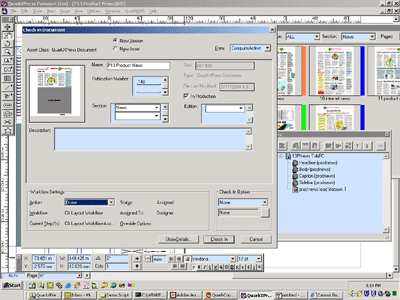
Figure 2a: This shows the Quark Editorial Manager client working within QuarkXPress, which includes check-in dialog box with a custom form, showing thumbnail and fields appropriate to the task at hand (Figure 2b). Workflow settings are at the bottom. Top right is the page planning information (Figure 2c). Bottom right, the article palette showing the structure of the article that is being checked in (Figure 2d). This will be automatically converted to XML on check in.
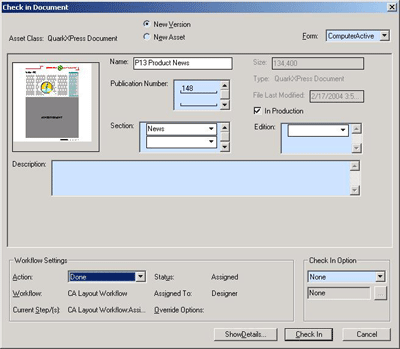
Figure 2b: The check-in dialog box.
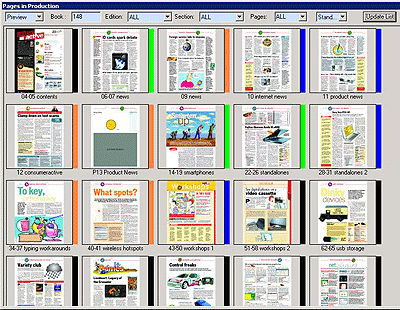
Figure 2c: The Page Planning palette (shown in preview mode) in the Quark Editorial Manager.
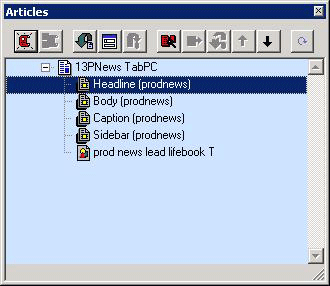
Figure 2d: The article palette. An article can contain both text and pictures.
- Quark Workflow Engine, which gives publishers the tools to design and execute workflows, track editorial elements, and monitor progress to help them refine processes, remove bottlenecks, and streamline their workflow. Quark Workflow Engine provides tools to define custom graphical workflow templates or structures that control how assets flow from one user to another. For example, one template can control how articles flow through the system, while another one controls how pictures are routed. Quark Workflow Engine has the capability to embed workflows, so that a primary workflow can initiate a secondary workflow, then return to finish the primary workflow. Templates support task assignment to users or groups, “job baskets,” escalation, and reminders, as well as both relative and absolute due dates (see Figure 3).
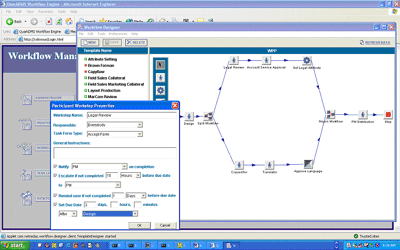
Figure 3: This shows the administrative portion of Quark Workflow Engine. The window at the front gives specific attributes of a particular workstep, including notification, escalation, and reminders. In the background, a graphical representation of the workflow is visible. You can create as many kinds of workflows as you want.
- Quark Media Portal, which allows external users (remote bureaus or freelancers) to access documents and tasks through a secure Web portal. Quark Media Portal users are able to access their tasks and edit or download documents and images (see Figure 4).
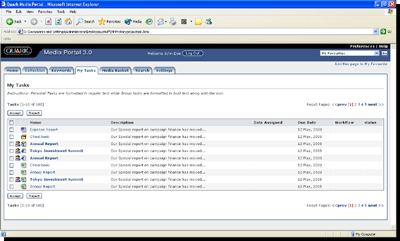
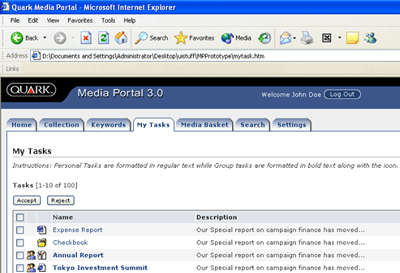
Figure 4: A simple, Web-based interface to all the content in the repository (overview, top; detail, bottom). Generally conceived for content consumers rather than content producers, but nevertheless gives an overview of a user’s tasks, access to stored queries, and so on.
- Quark Ad Production Manager, which simplifies the process of finding and placing the right ad, thus reducing the chances of a mistake. Quark Ad Production Manager allows publishers to define and manage workflow and scheduling for enhanced efficiencies. It also can be accessed from within popular publishing applications.
- Quark TextXPress, which offers editorial users exact copy fitting and the rich text formatting capabilities of QuarkXPress within Microsoft Word. Queries and tasks are directly accessible, as are previews of QuarkXPress layouts. Articles can be saved and sent through e-mail to remote users, who can also access QuarkXPress composition, 100 percent accurate copy-fit information, and WYSIWYG previews — without the need for special software.
- Quark Rights Manager, which simplifies the process of managing contracts and usage rights for your content. Publishers can create and complete contract templates through a Web browser, then directly link them to the content they manage. Publishers can quickly verify content use and easily provide reports on use and payment conditions (see Figure 5).
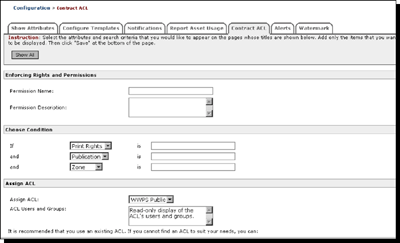
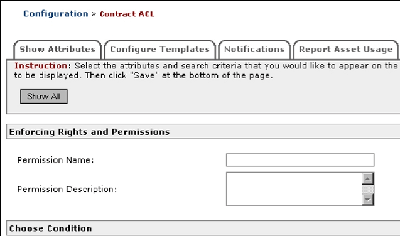
Figure 5: The Quark Rights Manager rights and permissions pane (overview, top; detail, bottom).
- Quark Web Content Manager, which provides tools to automatically syndicate a publisher’s print content to different destinations. As content is completed within your workflow, it can be formatted and delivered to news services or to the publisher’s Web site.
- Quark SOAP Integration Framework, which provides an easy-to-use interface that allows publishers to connect to nearly any business system a publisher has Two sample applications are included: Quark E-mail Client for Microsoft Outlook can automatically generate metadata and check in e-mail attachments by sending e-mail messages to a dedicated address; Quark Reporting Client for Microsoft Excel allows publishers to run queries inside Microsoft Excel and use the results in reports. Source code is included if users want to extend or customize either sample application.
- Quark Data Integration Toolkit XDK, which can be used to transform content, including text and graphics, while maintaining the original content. Publishers can import and export information, exchange information between systems, and perform XML conversion using XSLT (eXtensible StyleSheet Language is used to describe how an XML document will be presented. XSL Transformations are used to transform an XML document into another type of document, or another type of XML document.)
This article was last modified on January 18, 2023
This article was first published on April 6, 2004
Commenting is easier and faster when you're logged in!Loading comments...

Recommended for you
Four Under-the-Radar Lightroom CC Features Worth Knowing About
Adobe’s new Lightroom CC application is a streamlined sibling to Lightroom Class...

Use Bridge to Find and View All Linked Assets in an InDesign File
Quickly find and collect every linked asset in your InDesign project using this...

CreativePro Video: Swap Faces in Photoshop
In this week’s CreativePro video, Jesús Ramirez shows a fun Photoshop trick for...