



A.L. wrote:
I had an InDesign file that I saved as a PDF. By accident, I saved over that file with other content. Is there a way I can get the content from the PDF back into an InDesign file?
You are in luck! Earlier this year, Sandee Cohen alerted us to a new plug-in that would convert PDF files to InDesign files… but it wasn’t ready to be released Last week, while I was in Tokyo, Recosoft finally shipped this very cool and useful tool, called PDF2ID.
It’s quite astonishing to see a PDF opened in InDesign. You literally just choose File > Open PDF File, set up the Options dialog box, and click OK. The more complex the document, the longer it takes to convert, of course, but a 10-page document made of mostly text and a couple of images opened in about 15 seconds.
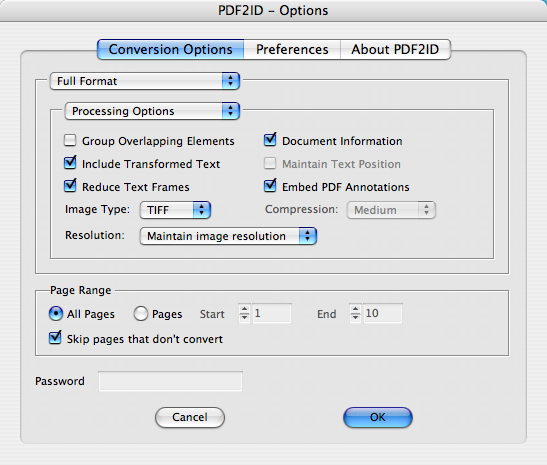
As was pointed out in the earlier post, PDF2ID isn’t meant for round-tripping your documents. Remember that a huge amount is lost whenever you create the PDF. For example, there’s no way a PDF file will “remember” your paragraph and character styles, so all the formatting is applied to text locally. The PDF doesn’t really understand how text flows from place to place on your page in most PDF files, so the plug-in has to guess. The result is a lot of unthreaded text frames.
However, even with its limitations, PDF2ID is far better than having to rebuild a document from scratch! And this may finally give people a way to “import” content from other formats. For example, someone could export a PDF from a MS Publisher document, open the PDF in InDesign, and then do some clean-up.
One of the most interesting things about this plug-in is that it imports some of Acrobat’s comments/annotations on to a new layer in the document. That can also be very helpful in some cases.
If you get a chance to try this plug-in, please leave your comments about it below!
This article was last modified on December 18, 2021
This article was first published on September 17, 2007
Commenting is easier and faster when you're logged in!

Recommended for you
Before&After Design Tip: Position Text for Quicker Reading
When words are critical, put them at the center of the design.

Interactive vs Print PDF in InDesign: Adobe’s Frustrating Mistake
David gets on his soapbox and points out a glaring problem with InDesign's PDF e...

Centering Objects on the Page in InDesign
Five ways to position anything perfectly in the center of a page.