




Even if you don’t care about making your PDF files accessible (though you should! it’s important), you should still turn on the Create Tagged PDF checkbox in the Export PDF dialog box. Frustratingly, this checkbox is not selected by default in most of the PDF Export Presets (such as PDF/X or Smallest Size). So you need to do it manually.
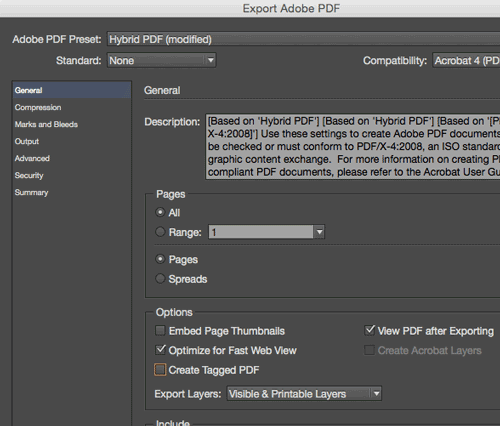
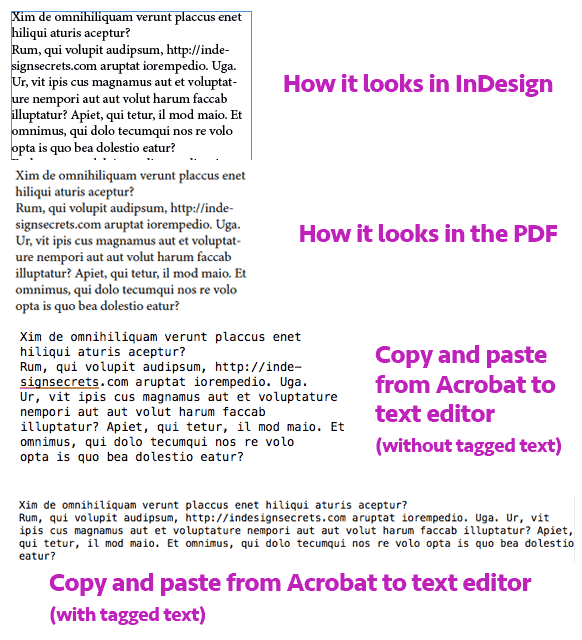
To understand why you should enable this feature, you have to understand how PDFs are made. In a PDF, every line of text — and sometimes every word, or even individual characters in a word — is positioned on the page with a coordinate. The result is that Acrobat (or Reader, or whatever PDF viewer you use) is simply placing letters or words or lines on a page, without any understanding of how they fit together.
That means if you select some text from a PDF and try to paste it someplace else (such as into Word or an email program), each line of text often ends up on its own paragraph! Also, sometimes hyphenated words at the end of a line can appear with a hyphen in them when you copy and paste.
Similarly, Acrobat’s hyperlink-recognition feature (where it looks for text that appears to be a hyperlink) generally breaks if the URL is hyphenated or broken across two lines.
However, if you turn on Create Tagged PDF when you export your PDF file, then you won’t generally have these problems. When PDFs are “tagged” then InDesign includes some XML-like structure tags in the background that you don’t see, but Acrobat (and some other PDF readers) can see. Those tags tell the PDF viewer that “this is a paragraph,” “this is a whole word,” and so on.
Here’s one other reason you want to enable the tagging feature: If you ever lose your original InDesign document and you need to recreate it from the PDF (using a tool such as Recosoft PDF2ID), having your text tagged can help a lot!
Note that I said “some other PDF readers” earlier… some PDF readers don’t seem to pay attention to these tags, so your mileage may vary. But Adobe Acrobat and Reader handle them great, so I almost always turn this checkbox on.
This article was last modified on August 8, 2019
This article was first published on January 7, 2015
Commenting is easier and faster when you're logged in!

Recommended for you

Quick Wins: Building Print Production Skills
Use these five resources to boost your prepress knowledge and skills.

Creating PDF Presentations in InDesign
Mike Rankin shows how to create a great presentation file with InDesign and deli...
Reduce PDF File Size the Smart Way in Acrobat
Shrink your PDF file size in Acrobat with Bart Van de Wiele.