




Peachpit Press is offering this book at a discount to creativepro.com readers. Follow this link.
Tip: Watch for Grouped Items
The Layers palette works independently of the Group feature, so grouped objects can have different items on different layers. That is, you can select one object in a group and move it to a different layer from the other items in the group. Similarly, you can select items from different layers and group them. This may or may not be a good thing, depending on how you work.
Tip: Watch What You Delete
As a safety measure, before you delete a layer, make the other layers invisible (see ” Tip: Hide Other Layers,” below). This way, you’ll be sure of what you are deleting on that layer.
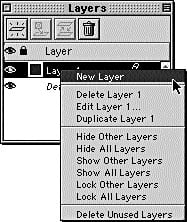
Figure 1: Layers palette’s context menu.
Tip: Hide Other Layers
Do you want to make all your layers invisible except one? No problem: Control-click in the eyeball column of the layer you want visible. If you Control-click in the Locked column, XPress locks all the other layers but that one. (This lets you lock all your layers: Control-click and then click in the Lock column of the layer.)
Read more Real World Tips for QuarkXPress 5 here.
Peachpit Press is offering this book at a discount to creativepro.com readers. Follow this link.
This article was last modified on February 22, 2022
This article was first published on June 26, 2002
Commenting is easier and faster when you're logged in!

Recommended for you
Type-o-Matic Blends Electronic Communication and Vintage Typewriters for Modern Fun
Please note: There will be absolutely nothing of an educational nature in this n...

Monotype Imaging Achieves Milestone: Over 100,000 Products on Fonts.com
For the first time, more than 100,000 font products are available from Monotype...

A Great Deal on the Ultimate Design Library
Inky Deals is offering two mega design bundles for an extremely discounted price...