



I love it when InDesign does stuff for me? not necessarily when it tries to think for me, but when it reduces a series of tedious tasks down to a single click or keystroke. One of the great under sung heroes of InDesign is the “repeat a bunch of stuff I just did” feature, otherwise known as Transform Sequence Again. This awesome little feature lives inside the Object > Transform Again submenu.
The key to understanding all the features in that menu is to remember that “transform” means: move, scale, rotate, or shear. InDesign doesn’t have a real “repeat whatever I just did” feature like some programs (though third-party developers are getting closer to being able to offer that). But if you’re trying to repeat a transformation, or several transformations, then these Transform Again features are just the ticket.
Transform Again has many uses, but here are two that I find kind of cool.
Make a Quick Bar Chart
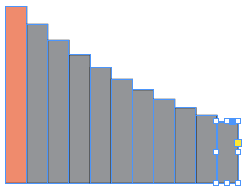
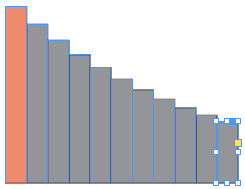
Here’s a quick bar chart with ascending or descending values. (These are multiplicative or logarithmic steps, but who’s counting?)
- Draw a rectangle.
- Duplicate it, and scale it. (Remember there is a difference between scaling and resizing. Dragging a corner or side handle just resizes it; that won’t help here. To scale an object, you need to use the Scale tool, the Free Transform tool, or the scale fields in the Control panel. The Free Transform tool is easiest because you can move, rotate, scale, and shear with a single tool; but the Control panel is more precise when you want to do it by the numbers.)
- Choose Object > Transform Again > Transform Sequence Again (or press Command-Option-4/Ctrl+Alt-4). And again? and again? and again, for each additional frame you want to create.
For example, here’s the first one (which I filled with a tint of red afterward, just to distinguish it), followed by some duplicates:
Building Geometric Shapes
But of course, why stop at scaling the frames? Why not rotate and shear them?
Here are some objects that I’ve transformed again and again. In each case I’ve colored the first object red (after the transformations), just to point out what I was starting with.

If you want to duplicate objects and keep them concentric, check out Mike Rankin’s post on that.
What other interesting effects might you achieve this this Transform Again trick? Explore and play!
This article was last modified on December 30, 2021
This article was first published on July 5, 2013
Commenting is easier and faster when you're logged in!

Recommended for you

How to Draw Concentric Shapes
Ever want to draw a series of concentric shapes? It may not be obvious how to do...

Eliminating the White Box Effect
One of the most common complaints of designers or print service providers when p...